
App Analytics App Store: Drive App Growth & Insights 2026
Unlock unparalleled app insights. Our guide covers app analytics app store and Play Store strategies to unify data for actionable growth in 2026.
Nuxie pricing reviewed October 6, 2026. Creation credits have separate plan charges. The revenue fee is waived when monthly attributed revenue is at most $10,000; above that threshold, 1% applies to the full adjusted net amount. See current Nuxie pricing.
You already have app analytics. You probably have too many of them.
App Store Connect shows product page views, installs, and sales. Google Play Console shows store conversion and some operational signals. Your product analytics tool tracks onboarding, feature usage, and retention. An attribution platform may sit in the middle, and your billing stack has its own view of trials, subscriptions, and entitlements. Each dashboard answers a narrow question well. None gives your team one reliable view of how acquisition quality connects to in-app behavior and revenue.
That gap hurts decision-making more than missing data ever does. Teams end up optimizing screenshots without knowing whether those installs finish onboarding. They revise onboarding without knowing whether the new users came from branded search, a custom product page, or a paid campaign. They compare paywall performance across iOS and Android while billing, analytics, and store data all define users differently.
Beyond Disconnected Dashboards
The practical problem with App Store analytics isn't a lack of metrics. It's that the metrics are split across different moments in the user journey.
Store analytics tell you what happened before install. Product analytics tell you what happened after first open. Billing tools tell you what happened after monetization intent. Growth work breaks when those systems stay disconnected.
That disconnect matters because app analytics is no longer a side tool. The global App Analytics market is projected at USD 9.81 billion in 2026 and USD 23.74 billion by 2031, with a 19.32% CAGR projection, which reflects how central data has become to retention and monetization strategy according to Mordor Intelligence's app analytics market forecast.
What disconnected dashboards actually look like
Typically, the workflow goes something like this:
- ASO or UA reviews store metrics: impressions, page views, installs, keyword movement.
- Product reviews activation: signup completion, onboarding drop-off, feature adoption.
- Revenue reviews subscriptions: trials, purchases, renewals, cancellations.
- Leadership asks one question: which acquisition paths bring in users who stay and pay?
If your stack can't answer that last question cleanly, each team starts optimizing its own local maximum.
Practical rule: If one dashboard tells you who installed and another tells you who retained, but neither can join those records reliably, you're not running growth. You're running separate reporting systems.
A strong operating model starts with one shared funnel. Discovery, store visit, install, first open, activation, monetization, and retention should be treated as one continuous system. That's the only way to know whether a store experiment improved business outcomes or just changed install volume.
For teams trying to get there, it helps to think in terms of connected funnel analysis instead of channel reports. Nuxie has a useful primer on what funnel analysis means in mobile growth, especially when multiple systems own different steps in the journey.
What a unified view changes
Once you connect those layers, better decisions get simpler:
| Question | Disconnected answer | Unified answer |
|---|---|---|
| Did the new product page work? | Installs increased | Users from that page completed onboarding and monetized better |
| Did the paywall test work? | Conversion changed | Conversion changed for specific acquisition cohorts |
| Did keyword traffic improve quality? | More organic installs | The new cohort retained better, worse, or the same |
That shift is the difference between reporting and operating. Good app analytics app store strategy doesn't stop at the storefront. It links the storefront to the product.
The Limits of Native App Store Analytics
A common growth review goes like this: App Store conversion improved, install volume is up, and the team calls the test a win. Two weeks later, trial start rate is flat and retained revenue is down. The problem usually is not the store test itself. The problem is that native store analytics stop before the business question is answered.
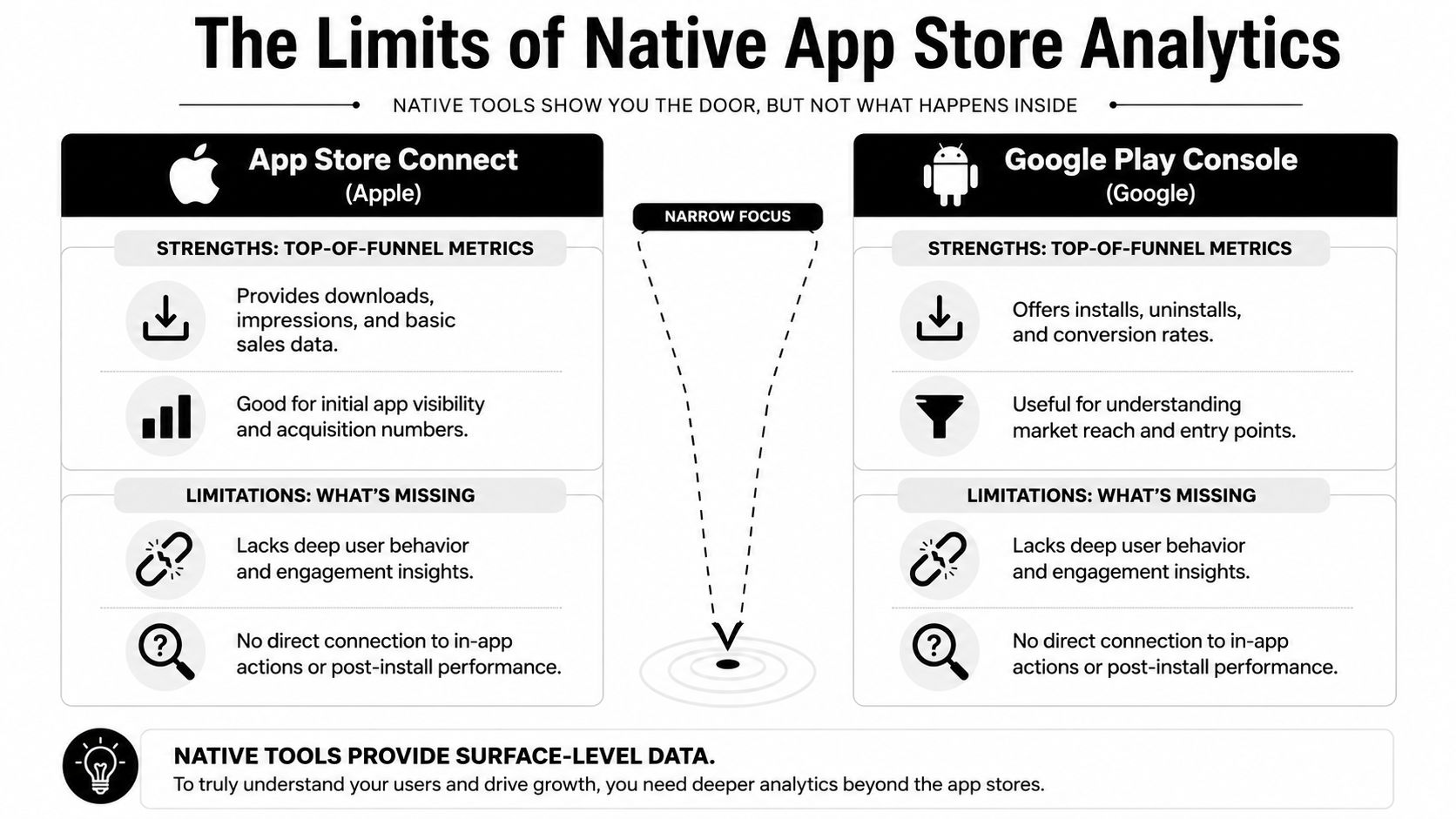
App Store Connect and Google Play Console are useful parts of the stack. They cover store exposure, listing performance, acquisition signals, sales trends, and release monitoring. They do not give a joined view of what happened after install for the same cohorts you acquired.
What native tools do well
At the store layer, native dashboards are strongest when the question is operational and close to the storefront.
App Store Connect is useful for evaluating product page performance, custom product pages, and sales patterns. Apple's own documentation defines Conversion Rate as Units divided by Product Page Views, which makes it a practical metric for product page optimization and for separating visibility problems from listing problems.
Google Play Console plays a similar role on Android. It helps teams monitor installs, uninstalls, store listing experiments, release health, and version-level issues. For day-to-day acquisition diagnostics, both tools are fast and credible.
Where they stop being enough
The limitation is structural. Native store analytics measure store behavior. Growth teams need to connect store behavior to product behavior.
A native dashboard can tell you that a user saw a listing and installed. It usually cannot tell you whether that user completed onboarding, reached an activation event, hit a paywall, restored a subscription, or retained past the first week. Those questions depend on event instrumentation inside the app, billing data, and cohort analysis built around mobile app engagement metrics that reflect post-install behavior.
That gap matters in real decisions. A custom product page can lift installs while bringing in lower-intent users. A keyword change can increase organic volume while hurting activation quality. If the team reads store metrics without in-app outcomes, it can scale the wrong traffic and misread creative wins.
Native store tools answer "did users install?" Growth teams also need "which acquisition source or page drove those installs, what happened after first open, and did those users retain or monetize?"
The privacy and sampling problem
There is also a measurement gap inside Apple's native analytics. A material share of App Store Connect analytics depends on users who allow Apple to share app usage data, while your product team still has to make decisions for the full install base. Respectlytics explains the practical difference in its comparison of App Store Connect and third-party analytics coverage.
That creates a sampling risk, not just a reporting inconvenience.
If the observed cohort behaves differently from the users you cannot observe in the same way, product and monetization decisions can drift. Teams may redesign onboarding around behavior that is not representative, or overvalue a campaign because the visible sample looks stronger than the broader population.
What native data should be used for
Use App Store Connect and Google Play Console for the jobs they handle well:
- Discovery diagnostics: whether impressions become page visits and installs
- Store creative evaluation: icon, screenshots, copy, and custom page performance
- Sales validation: native transaction and revenue trend checks
- Release checks: version performance, store readiness, and operational issues
Use another layer for post-install analysis. Once the question is about activation, retention, monetization, or cohort quality by acquisition source, native store analytics are only one input, not the decision system.
Connecting Acquisition Metrics to Engagement Metrics
Once the native limits are clear, the next step is to separate two metric families that teams often mix together.
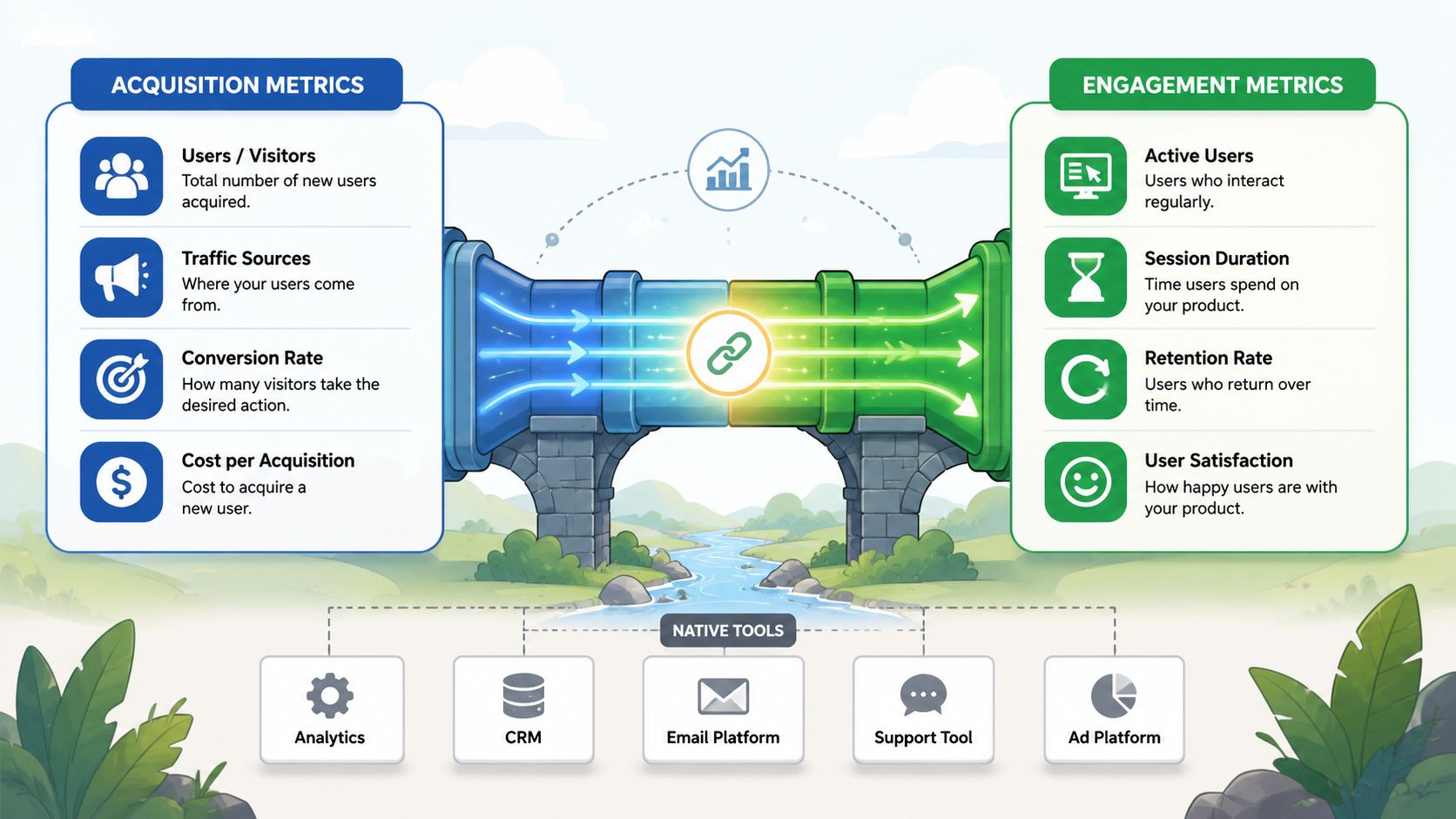
The first family is store-level acquisition metrics. The second is in-app engagement and monetization metrics. They belong in the same narrative, but they shouldn't be read the same way.
Store metrics tell you where friction starts
At the app store layer, the main job is to understand discovery and install intent.
A simple way to read those signals:
- Impressions indicate visibility. If impressions are high but page visits stay weak, your icon, title, ranking position, or search relevance may not be doing enough.
- Product Page Views indicate listing engagement. Users were interested enough to inspect the app.
- Conversion Rate in App Store Connect is calculated natively as Units divided by Product Page Views, which makes it a direct read on how well your listing turns interest into installs in Apple's definition of App Store conversion metrics.
Those metrics are necessary, but they aren't self-sufficient. A higher conversion rate is only good if those users do something useful after install.
In-app metrics tell you whether the acquired user was worth winning
Once users open the app, your center of gravity shifts.
Here, teams care about questions like:
| In-app metric | What it actually helps you decide |
|---|---|
| Retention | Whether acquisition quality and onboarding are producing repeat use |
| Feature adoption | Whether users reach the product's core value quickly |
| Churn signals | Which moments predict drop-off and need intervention |
| LTV | Which channels, pages, or cohorts generate durable value |
That split is why a store report and a product report often disagree in tone. One says acquisition improved. The other says activation declined. Both can be right.
For teams building a shared language around these metrics, Nuxie has a practical guide to mobile app engagement metrics that matter after install.
The interpretation layer is where teams usually fail
What matters isn't the metric name. It's the action tied to it.
If product page views rise and installs don't, the listing likely isn't matching user intent. If installs rise and onboarding completion falls, acquisition quality may have changed or your first session may be overcomplicated. If paywall views increase but purchases don't, pricing, timing, or audience targeting may be off.
This explainer is worth watching if your team is still treating store conversion as the finish line rather than the start of deeper analysis.
A healthy acquisition funnel can still feed an unhealthy product funnel. That's why install growth without cohort analysis often creates more noise than insight.
The practical takeaway is simple. Measure acquisition and engagement separately, but review them together. That's how app analytics app store work becomes useful to product and revenue decisions instead of staying trapped in ASO reporting.
How to Build a Unified Analytics Stack
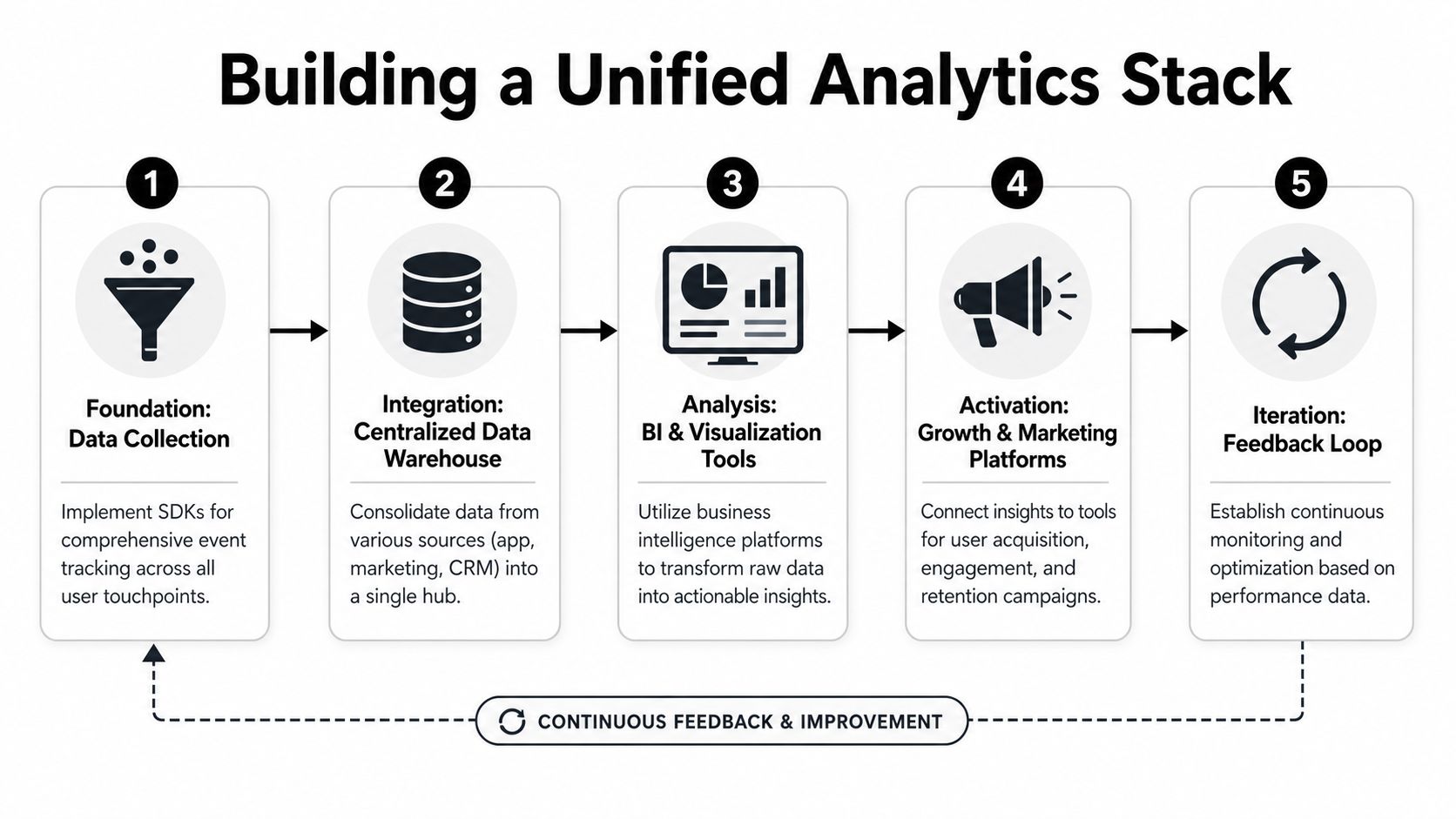
A complete mobile stack needs four layers working together. Store analytics, product analytics, attribution logic, and monetization infrastructure. Teams often have all four in some form. The main problem is data flow between them.
A unified stack isn't one vendor. It's an architecture.
Layer one is the store truth
Start with the native storefronts. On iOS, App Store Connect should own impressions, product page views, units, custom product page results, and native commerce checks. On Android, Google Play Console should own store listing performance and release-side store operations.
This is your acquisition surface, not your full user model.
If you're pulling this data manually in spreadsheets, clean that up first. Teams moving beyond ad hoc reporting usually benefit from programmatic export and normalization. A practical place to start is understanding the App Store Connect API workflow so store metrics can be joined consistently with product and billing records.
Layer two is event-based product analytics
Inside the app, define an event schema that survives platform differences.
For iOS and Android native apps, that means keeping event names, user properties, and session logic aligned. For React Native and Flutter apps, the risk is wrapper inconsistency and event drift across shared code and native modules. Flutter is often a strong fit for UI-heavy experiences because it tends to use less CPU time and a smaller memory footprint than React Native equivalents, with rendering that stays close to native performance for many standard commercial apps according to this analysis of cross-platform mobile development trade-offs.
For game teams, the same principle applies inside Unity or Unreal. Instrument economy events, tutorial completion, liveops exposure, purchase attempts, and entitlement state changes as first-class product events. If you're using Godot for mobile games, recent engine support for Google Play Billing and Apple StoreKit 2 gives teams a more direct path to billing and entitlement handling inside the engine according to AppRadar's summary of mobile game engine capabilities.
Layer three is attribution and cohort stitching
In these instances, teams often overspend or overtrust.
You don't always need a heavyweight MMP for every decision, but you do need a consistent identity and cohort model. Organic, paid, referral, custom product page, and keyword-driven cohorts should all land in the same analysis layer as onboarding completion, subscription starts, and retention events.
A few implementation rules help:
- Keep a stable user key: tie store install context to post-install events as early as possible.
- Store campaign and page metadata: if a user lands from a custom product page or campaign-specific listing, preserve that context downstream.
- Version your schema: growth questions change. If event definitions subtly drift, analysis breaks.
Layer four is billing and entitlement truth
Subscription data is where many stacks become fragmented again. StoreKit, Google Play Billing, server-side receipt handling, and third-party subscription tools often disagree on timing, entitlement state, or customer identity.
A better setup gives product, growth, and support teams one entitlement view, while still allowing flexibility in the billing layer. That's why provider-agnostic infrastructure matters. Nuxie, for example, works alongside tools like RevenueCat or StoreKit and doesn't charge a revenue-share fee for billing and entitlement data, which is a meaningful structural distinction for teams planning to scale monetization as described in Nuxie's comparison of provider-agnostic subscription infrastructure.
Operator note: Billing data shouldn't live in a monetization silo. Entitlement state affects onboarding, paywall access, feature exposure, support workflows, and churn prevention.
What the final stack should produce
The end state is a single working model of the user journey:
- A user sees the app in the store.
- The store records exposure and listing interaction.
- The app records first open, onboarding, feature use, and revenue events.
- Billing confirms purchase state and entitlement access.
- Your team can segment, experiment, and act on that combined history.
That's the difference between having tools and having a growth system.
Actionable Workflows for Your Growth Team
A unified stack only matters if teams use it to make faster, sharper decisions. The easiest way to pressure-test your setup is to run a few workflows that force store data and in-app data to work together.
Workflow one for discovery quality
A common problem is organic growth that looks healthy in the store but weak in the product.
The hard question is whether organic App Store search traffic is producing users who reach activation. That's also one of the least well-answered topics in this space. A major gap is connecting organic App Store search conversions to specific in-app funnels without an expensive MMP, which requires cross-referencing organic keyword performance with cohort-based retention data as discussed in this app analytics guide focused on attribution gaps.
Here's the workflow that works better than isolated ASO reporting:
- Pull store cohort context: keyword theme, product page, campaign tag, country, platform.
- Join it to FTUE milestones: install, first open, account creation, tutorial completion, first key action.
- Review cohorts weekly: not just installs by keyword, but onboarding completion by keyword class or landing page.
If one keyword cluster drives installs but that cohort stalls before activation, don't celebrate the acquisition result. Rewrite the listing to better pre-qualify users, or adjust onboarding to match the expectation that search term created.
Workflow two for paywall and purchase optimization
Paywall testing often fails because teams segment by platform or country only. That leaves too much intent data unused.
A stronger workflow segments users by acquisition context and first-session behavior. Users who came through a feature-specific custom product page may need a different paywall than users who arrived through broad branded search. React Native and Flutter teams can implement this cleanly if acquisition properties are available inside the app before the first monetization decision. Unity and Unreal teams can do the same for premium item shops, battle pass prompts, or subscription offers in games.
A practical review format looks like this:
| Cohort | In-app moment | What to test |
|---|---|---|
| Store page visitors with strong intent | Early paywall | Offer framing and plan presentation |
| Broad discovery traffic | Delayed paywall | Education before monetization |
| Returning non-payers | Re-entry offer | Timing, reminder copy, softer commitment |
Don't ask, "Which paywall wins?" Ask, "Which paywall wins for which acquisition cohort?"
The best paywall isn't universal. It's the one that fits the expectation the user brought in from the store.
Workflow three for retention intervention
Retention work gets much better when entitlement, behavior, and acquisition history sit together.
Say a user installs from iOS search, completes onboarding, views a premium feature, declines the paywall, returns twice, and then goes quiet. That user shouldn't receive the same recovery flow as a user who subscribed, lost entitlement, and failed to restore purchase state. The event history is different, so the intervention should be different too.
Good workflows typically include:
- Behavioral triggers: stalled onboarding, repeated feature exploration without conversion, drop-off after trial exposure.
- Contextual messaging: survey, feature education, restore prompt, retention offer, or content recommendation.
- Cross-platform delivery: the same journey logic should work across iOS, Android, React Native, Flutter, Unity, and Unreal, even if the UI presentation differs.
Modern in-app experience tooling helps teams ship onboarding quizzes, surveys, announcements, paywalls, and retention screens remotely instead of waiting on a full release cycle.
Workflow four for billing confidence
Many teams discover analytics problems through support tickets.
A user says they paid but lost access. Another says they never saw premium access after restoring. If billing state, purchase events, and entitlement logic aren't visible together, support and product both waste time reconstructing truth from separate systems.
The better pattern is simple. Log purchase attempt, purchase result, entitlement grant, entitlement revoke, and restore events in the same analytics stream the growth team uses. Then QA those flows on iOS and Android before every major monetization change.
That isn't glamorous work. It prevents bad data and broken trust.
The Future Is an AI-Native Growth Partner
The next shift in app analytics app store work isn't another dashboard. It's a system that helps teams decide what to do next.
Most analytics stacks are still passive. They collect, display, and wait. A person has to notice the drop in conversion, formulate a hypothesis, identify the cohort, design the experiment, ship the in-app experience, and review the result. That's slow, especially for lean mobile teams managing iOS, Android, and cross-platform codebases at the same time.
AI-native growth systems change the operating model. Instead of only reporting what happened, they help connect store signals, in-app behavior, monetization state, and experiment opportunities. That matters most in environments with fragmented tooling, privacy limits, and frequent release pressure.
What teams should expect from the next generation
The useful version of AI in growth isn't generic summarization. It's operational help.
Teams should expect a platform to surface meaningful anomalies, suggest segments worth testing, connect acquisition context to monetization behavior, and shorten the path from insight to shipped experiment. For mobile apps and games, that also means supporting the runtime layer where experiences are delivered. Onboarding, surveys, feature announcements, paywalls, liveops moments, and retention offers all need to be editable, targetable, and measurable without turning every change into an app release.
The companies that win won't be the ones with the most dashboards. They'll be the ones that can turn fragmented data into a working feedback loop across acquisition, product, billing, and retention.
If your team wants one place to design in-app journeys, run experiments, analyze cohorts, manage billing and entitlements, and connect growth decisions across iOS, Android, React Native, Flutter, Unity, and Unreal, take a look at Nuxie. It gives mobile app and game teams an AI-native workspace for analytics and activation with costs and integration requirements to evaluate separately.