Meaning of in App Purchases: IAP Monetization in 2026
Explore the meaning of in app purchases with our technical guide for 2026. Covers IAP types, platform billing, validation, and advanced monetization strategies.
A lot of teams hit the same moment. The app is working, activation is decent, and someone asks the question that changes the roadmap: should we sell a subscription, make premium features available once, or build a consumable economy inside the product?
That question sounds like pricing. It usually isn't. It's product design, entitlement logic, store compliance, analytics, experiment velocity, and retention strategy packed into one decision.
The meaning of in app purchases has expanded far beyond “users can buy something in the app.” For mobile teams, IAP now sits inside the core loop of acquisition, engagement, monetization, and lifecycle management. If you build on iOS, Android, React Native, Flutter, Unity, or Unreal, you don't just choose a payment method. You choose how value is packaged, when it is presented, how access is granted, and how the whole system evolves after launch.
Beyond the Transaction What In App Purchases Really Mean
When a new team member asks what an in-app purchase is, the textbook answer is simple. It's a purchase of digital goods, services, or content made inside an app.
That definition is correct, but it misses the operational reality. In practice, in-app purchases are the commercial layer of a mobile product. They determine how users move from free to paid, how features are gated, how users restore access across devices, and how growth teams test monetization without breaking trust.
Why teams treat IAP as a core business system
This isn't a niche pattern. 50% of non-game apps and 79% of game apps use in-app purchases, and IAPs account for 48.2% of mobile app earnings globally. Business of Apps also estimates consumers spend about $380 billion worldwide on in-app purchases (Business of Apps on in-app purchase adoption and revenue).
Those numbers matter because they change the framing. If you're building a mobile product, IAP isn't a side feature for “later.” It often shapes onboarding, feature access, lifecycle messaging, and even your release process.
Practical rule: If paid access changes what a user can do, then billing and product design need to be planned together, not handed off to engineering at the end.
What the meaning of in app purchases looks like in real products
The meaning of in app purchases depends on the app category.
- For games: IAP often means a managed economy. Currency packs, energy, cosmetics, bundles, and timed offers all need purchase state and entitlement state to stay in sync.
- For utility and productivity apps: It usually means feature gating. A user hits a usage threshold, sees a paywall, upgrades, and expects immediate access everywhere.
- For media, education, and AI apps: It often means ongoing access. The purchase isn't just “activate pro.” It's continued use, credits, premium content, or subscription-based access over time.
That last category is increasingly important because the purchase is no longer isolated. It becomes part of a recurring experience loop.
The strategic shift
Teams that do this well stop thinking in terms of “checkout.” They think in terms of:
- Value packaging
- Store-compliant billing
- Entitlement delivery
- Experimentation
- Retention after purchase
That's the essence of in app purchases in modern mobile products. It's not just a transaction. It's the system that connects monetization to the user experience.
The Four Foundational Types of In App Purchases
The store APIs expose different purchase types because not all digital value behaves the same way. Some items get used up. Some become available permanently. Some expire unless renewed.
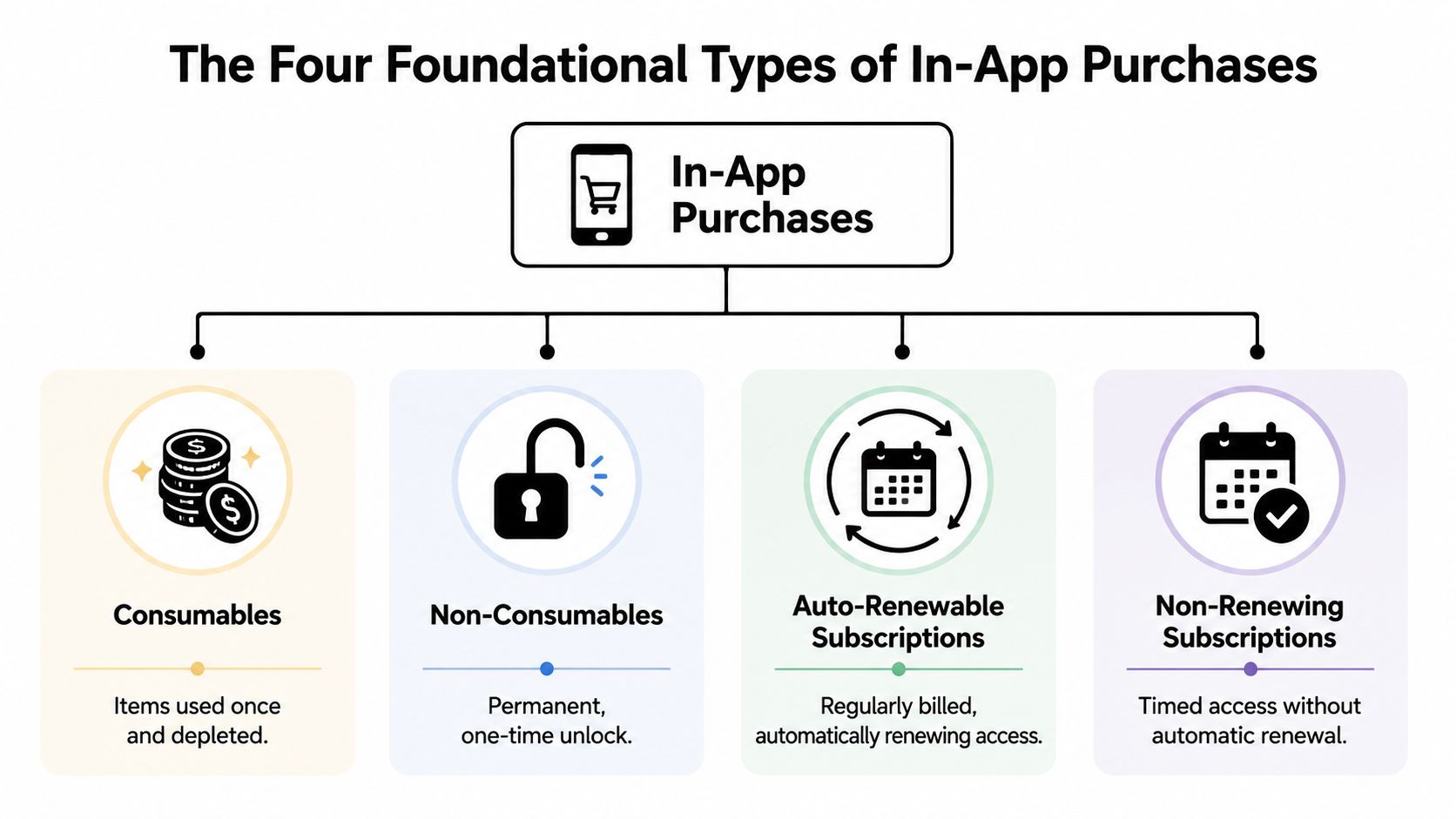
AppsFlyer groups IAPs into consumables, non-consumables, and subscriptions, and that distinction matters because subscriptions create recurring revenue while consumables are re-purchased, changing how teams model lifetime value and retention (AppsFlyer glossary entry on in-app purchase types).
Consumables
Consumables are items a user can buy, use, and buy again.
In games, this is the obvious category: coins, gems, boosters, extra lives, energy refills. In non-game apps, it can also mean export credits, generation credits, or usage packs. The entitlement here is temporary or decrementing. You aren't granting permanent access. You're updating a balance.
What works well with consumables is clear utility. A player understands what 500 gems do. A creator understands what five export credits do. What fails is vague value. If users can't picture the benefit immediately, repeat purchases stall.
Non-consumables
Non-consumables are one-time purchases that make something permanently available.
Typical examples include ad removal, a pro toolkit, a premium filter pack, or a feature bundle that doesn't expire. The entitlement logic is simpler than consumables because the user owns the purchased item and should be able to restore it across devices under the same account.
This model works when the available value is stable and easy to communicate. It works badly when the product keeps changing and users expect ongoing updates, support, or cloud functionality. In those cases, a one-time payment can create revenue tension for the team.
Auto-renewable subscriptions
This is the most important category for many apps outside gaming. The user pays on a recurring schedule and access continues unless the subscription is canceled or expires.
Streaming, productivity, wellness, education, creator tools, and many AI apps fit here. The entitlement is time-bound and renewable. That means your system has to track active status, grace periods, renewals, cancellations, and restoration.
A subscription is not just a price plan. It's a promise that access state will stay correct over time.
Non-renewing subscriptions
Non-renewing subscriptions provide access for a fixed period, but they don't automatically continue. The user must purchase again to regain access after the period ends.
These can fit seasonal content, event passes, limited programs, or fixed-duration premium access. Teams often underestimate the reactivation work here. Because renewal is manual, your messaging and entitlement expiration handling need to be deliberate.
Comparison of In-App Purchase Types
| Type | Can be Repurchased? | Restorable Across Devices? | Primary Use Case | Example |
|---|---|---|---|---|
| Consumables | Yes | Usually no, because they are depleted after use | Repeat purchase economies and usage packs | Coins, gems, extra credits |
| Non-consumables | No | Yes | Permanent feature or content unlocks | Ad removal, pro unlock |
| Auto-renewable subscriptions | Yes, through recurring billing | Yes | Ongoing premium access | Monthly premium plan |
| Non-renewing subscriptions | Yes, but manually | Usually yes during active period | Fixed-duration access | Season pass, timed course access |
Entitlements are the part teams can't skip
Every purchase type maps to an entitlement, which is the right the user gains after payment. A coin pack changes balance. A pro upgrade grants a permanent capability. A subscription grants time-based access.
If your team gets that model wrong, everything downstream gets messy. Paywalls become disconnected from access rules, support tickets rise, and analytics stop answering the core question: what did the user buy, and what should the app let them do now?
Navigating Platform Billing Systems and Rules
In-app purchases don't behave like a normal web checkout embedded inside an app. Apple and Google run the transaction flow, define major policy boundaries, and control many of the edge cases that affect delivery and access.
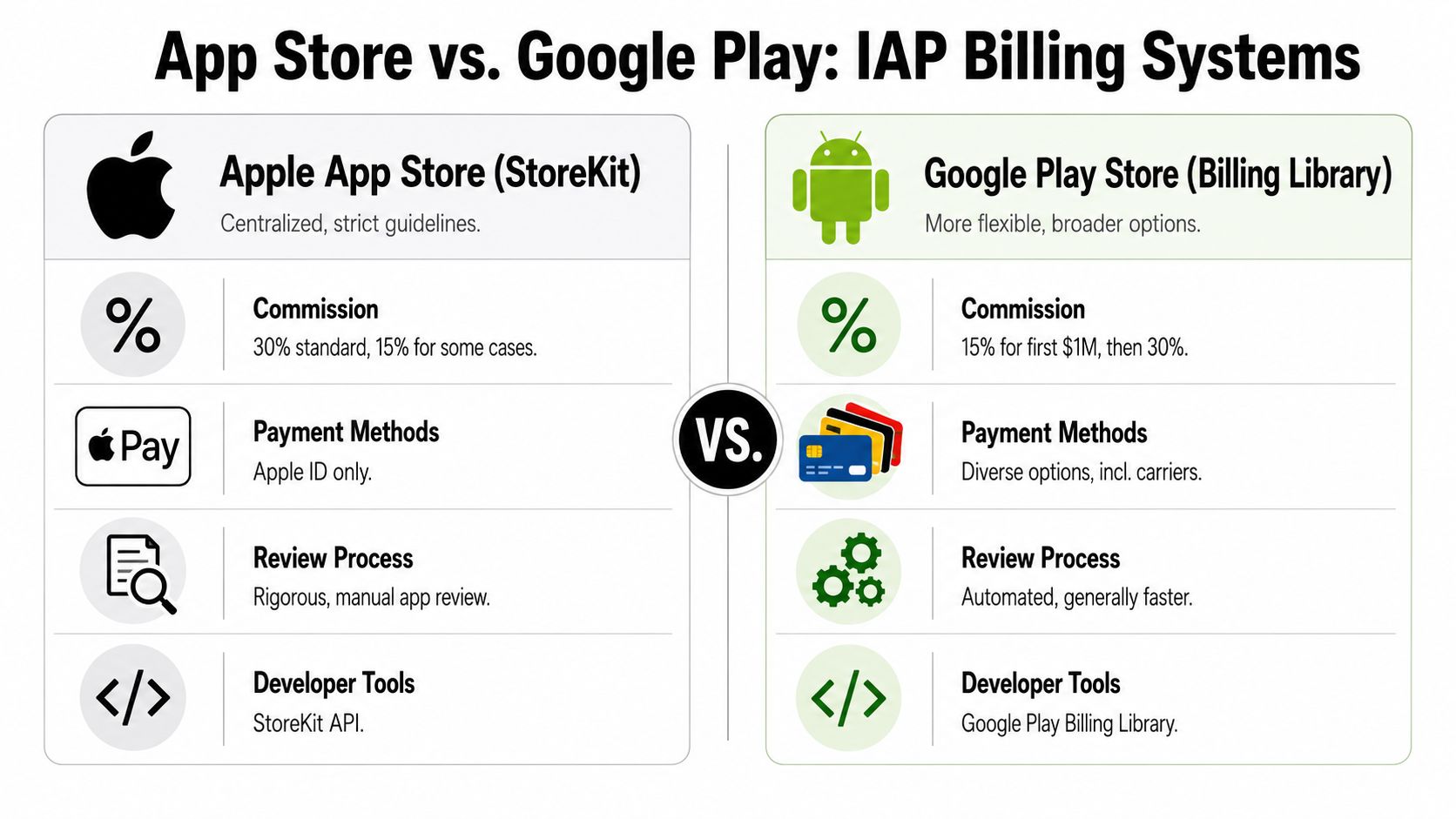
Adjust describes IAPs in major ecosystems as a platform-governed commerce flow, with Apple's App Store In-App Purchase system and Google Play Billing handling the payment stack and entitlement-related constraints (Adjust on how in-app purchases work in mobile ecosystems).
Apple and Google are similar in concept, different in practice
Both platforms let you define products, trigger native purchase flows, receive transaction data, and restore access. But the implementation details aren't interchangeable.
| Area | Apple App Store | Google Play |
|---|---|---|
| Product framework | StoreKit | Google Play Billing |
| Payment flow | Native App Store purchase flow | Native Google Play purchase flow |
| Transaction output | Apple transaction and receipt-oriented flow | Google purchase token-oriented flow |
| Restore behavior | Strong user expectation for restore purchases | Usually account-based with Play purchase state |
| Backend sync | Needs careful handling of status updates and account mapping | Needs careful token tracking and purchase state updates |
| Rule complexity | Strict review and policy interpretation | Broad platform coverage, different operational quirks |
A useful technical overview sits in Nuxie's guide to mobile billing systems, especially if you're deciding whether to keep a thin client integration or build a fuller billing layer.
The implementation constraints teams feel first
Teams often run into the same friction points early:
- Store-defined product catalogs: Product IDs, subscription groups, offers, and regional availability live in store consoles, not just in app code.
- Asynchronous purchase state: Payment completion, renewal events, refunds, and access changes may arrive after the original client action.
- Restore and account linking: Users expect past purchases to reappear, even if they switch devices or reinstall.
- Review and policy alignment: Messaging, buttons, and purchase flows can trigger review issues if they don't match platform expectations.
Here is the video version if you want a quick visual comparison before building:
Region-specific rules matter more than they used to
The old mental model was simple: digital goods inside the app mean platform billing. That's still the default. But teams now also have to account for regional policy changes and category-specific exceptions.
That doesn't make IAP easier. It makes architecture more conditional. A product team may need one entitlement model globally, with different billing and offer presentation logic depending on market and platform policy.
If your monetization logic assumes one universal billing rule, you'll end up with product debt, not just compliance risk.
For engineering, this means you can't treat store integration as a static SDK task. It's a maintained commerce layer.
The Core In App Purchase Implementation Workflow
The cleanest mental model is to treat IAP as a pipeline. A user sees an offer, the app requests store data, the platform handles payment, your backend validates the purchase, and the app updates access.
That sounds linear. In production, it rarely is. Devices go offline, receipts arrive late, app accounts don't always match store accounts, and the user expects access to work anyway.
The five-step workflow
Fetch products from the store
The app requests the configured products from Apple or Google. This step keeps the UI tied to real store metadata rather than hardcoded text. If the store doesn't return the product, don't show a buy button for it.Launch the native purchase flow
The app initiates StoreKit or Google Play Billing. The user confirms with the platform prompt. At this point, the app hands control to the store for payment authorization.Receive the transaction artifact
After purchase, the client receives transaction details, such as a receipt or purchase token depending on platform. This isn't the same as final entitlement. It's the evidence you need to verify.Validate server-side
This is the security-critical step. Your backend should verify the purchase against the relevant store systems, normalize the result, and decide what entitlement the user should have. Client-only activation is fast to prototype and fragile in production.Grant and sync entitlements
Once validated, the backend updates entitlement state and the app reflects it immediately. At this point, restore logic, cross-device access, and subscription status updates become durable.
Implementation advice: Grant access from a trusted backend state, not from a button tap or a local transaction callback alone.
Why server-side validation wins
Client-side validation feels simpler because it's faster to wire up. For prototypes, it can be tempting. For shipped apps, it creates support and fraud problems.
A backend gives you a source of truth for:
- Cross-device restore
- Subscription status changes
- Refund and cancellation handling
- Customer support visibility
- Analytics tied to real entitlement state
If you're building on React Native, Flutter, Unity, or Unreal, this matters even more because client abstractions can hide platform differences until something breaks. Cross-platform purchase libraries help, but they don't remove the need for a reliable backend entitlement layer.
Cross-platform teams need an abstraction plan
Native iOS and Android teams can work close to StoreKit and Google Play Billing. Cross-platform teams usually need one more layer so product logic isn't duplicated across clients.
That layer can be in-house, or it can be a vendor-backed billing and entitlement system. What matters is that it handles store normalization, user mapping, restore behavior, and access state consistently. If you're starting with Apple-specific implementation details, this iOS in-app purchase guide is a practical reference for the client side of the flow.
What doesn't work is splitting truth across three places: store dashboards, local device state, and ad hoc backend tables. The system becomes hard to debug the first time a subscription renews on one device and fails to activate on another.
Designing Your Monetization Strategy and UX
Teams usually overfocus on pricing and underfocus on timing, context, and message fit. Most IAP performance issues aren't caused by the billing SDK. They're caused by presenting the wrong offer at the wrong moment, or by asking users to pay before the app has earned the right to ask.
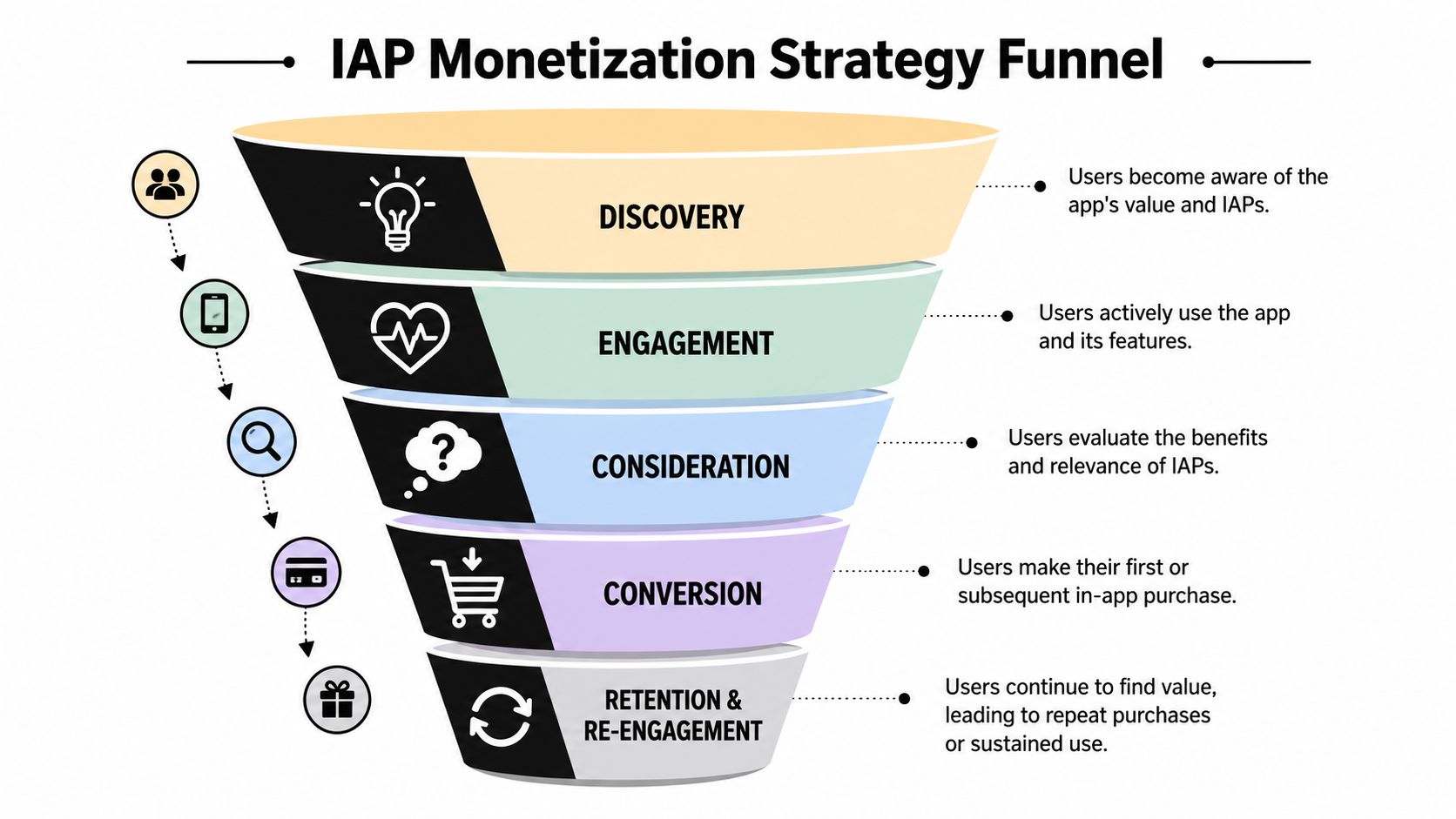
The freemium model is tightly linked to IAP. Pushwoosh notes that global IAP revenue on iOS and Google Play reached $39.4 billion in the last quarter of 2024, up about 13.5% year over year, driven by users paying for digital goods and subscriptions inside free-to-download apps (Pushwoosh on late-2024 in-app purchase revenue growth).
What a good paywall actually does
A paywall is not a pricing page pasted into a mobile screen. It needs to answer three questions quickly:
- Why should I pay now?
- What do I get immediately?
- What happens if I don't?
The strongest paywalls usually appear right after the user experiences value, not before. In a productivity app, that might be after exporting a project. In a game, it might be after a progression spike. In an AI app, it might be right after the user gets a useful output and wants more.
The UX trade-offs teams need to manage
There isn't one ideal monetization surface. You choose among trade-offs.
Hard gate versus soft gate
A hard gate blocks access entirely until purchase. A soft gate lets the user continue, but limits depth, speed, or advanced functionality.
Hard gates can convert when the app's value is already obvious. They also increase bounce risk if shown too early. Soft gates often work better when the user still needs to build conviction.
Subscription-first versus one-time unlock
Subscription-first pricing fits products that provide ongoing value, updates, or time-based access. One-time purchases fit stable features and simpler ownership expectations.
Trouble starts when teams mismatch the model to the product. Users resist subscriptions for static utility access. Teams regret one-time pricing when infrastructure and support costs continue.
Broad audience versus segmented offers
A single default paywall is easier to manage. Segmented offers usually monetize better because different users respond to different value framing.
You might segment by behavior, feature usage, app category, or progression stage. The important point isn't personalization for its own sake. It's matching the offer to demonstrated intent.
Monetization UX gets better when it responds to behavior, not when it interrupts behavior.
What to measure
A serious IAP setup tracks more than purchases.
- Paywall impressions: Who saw the offer and in what context.
- View-to-purchase flow: Where users dropped between seeing value and buying.
- Entitlement activation: Whether paid access was granted and used.
- Post-purchase retention: Whether the offer attracted the right users, not just any users.
- Restore and support friction: Whether users can recover access without confusion.
Teams often test copy, layout, and price presentation. They should also test trigger timing, feature packaging, default plan selection, and the screen that appears right after purchase. The post-purchase moment is where many apps waste the momentum they just earned.
Unifying Your Growth Stack with an Experience Platform
Most mobile teams don't have an IAP problem in isolation. They have a fragmented stack problem. Billing lives in one system, paywalls in another, analytics in several dashboards, and entitlement logic somewhere in backend code that only a few engineers want to touch.
That fragmentation slows down every monetization decision. Product wants to test a new offer. Growth wants segment-based targeting. Engineering wants fewer store-specific edge cases. Support wants to know why a paid user lost access. Each team is looking at a different source of truth.
What the unifying layer needs to do
A practical experience platform should cover four connected jobs:
- Experience delivery: Build and ship paywalls, onboarding flows, upgrade prompts, and retention offers without waiting on a full app release.
- Experimentation: Test triggers, messages, layouts, and offer logic against real user behavior.
- Analytics: Connect impression, action, purchase, and entitlement data in one analysis path.
- Billing and entitlements: Normalize purchase events and keep access state reliable across clients and platforms.
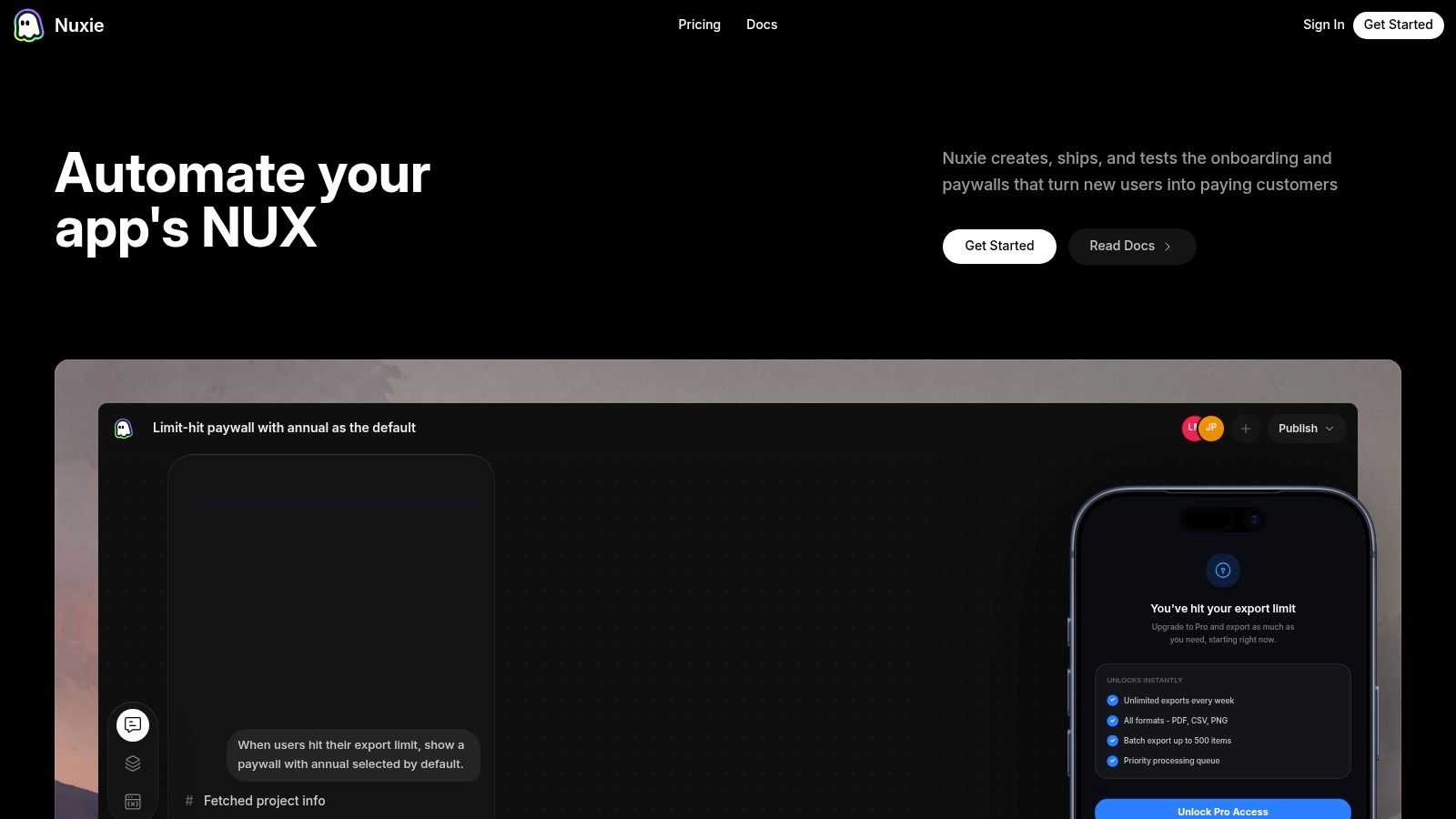
That is where a tool like Nuxie's in-app experience platform fits. It provides provider-agnostic in-app experiences, experiments, analytics, billing, subscription sync, purchase data, and entitlement infrastructure across iOS, Android, React Native, Flutter, Unity, and Unreal, and it can work alongside existing tools rather than forcing a full rip-and-replace. For teams that care about billing data ownership, the no-revenue-share approach also changes the evaluation criteria.
Where teams usually get the biggest benefit
A unified setup tends to matter most in three situations.
Cross-platform products
When iOS, Android, and game clients all need the same commercial logic, duplicated flows become expensive. A shared experience and entitlement layer reduces drift between platforms.
Fast-moving monetization teams
If every paywall test requires a client release, experimentation slows to a crawl. Teams need remote configuration, segmentation, and analytics tied directly to the screen and offer shown.
Products with more than one paid moment
Many apps no longer have a single subscription screen. They have onboarding offers, contextual upsells, win-back prompts, upgrade prompts, usage-limit walls, and liveops moments. Managing those as disconnected one-off screens usually creates inconsistency.
A fair point: some teams can stitch this together themselves, especially if they want maximum internal control and have strong mobile and backend capacity. Others prefer separate vendors for billing, paywalls, and analytics. That can work too. The trade-off is coordination cost. Someone still has to make the data model and entitlement logic line up across the stack.
Conclusion IAP as a Core Product Loop
The meaning of in app purchases isn't just “buying something inside an app.” That's the smallest possible definition, and it's rarely the one that helps a team ship a strong monetization system.
In practice, IAP is a product loop. You package value, present it at the right moment, route the purchase through platform billing, validate it reliably, grant entitlements correctly, and keep learning from what users do next. That loop sits inside onboarding, feature adoption, retention, and support.
The technical details matter because store rules, receipts, purchase tokens, renewals, restore flows, and cross-platform state can break the user experience fast. The UX details matter because even a flawless billing stack won't save a weak offer shown at the wrong time. The analytics layer matters because purchase events without entitlement and behavioral context don't tell you how to improve.
Teams that treat IAP as an isolated checkout feature usually end up patching issues screen by screen. Teams that treat it as part of the product system make cleaner decisions about packaging, access, experiments, and lifecycle design.
That mindset is what holds up in 2026. The apps and games that monetize well won't be the ones that added purchases. They'll be the ones that built purchase, access, and experience as one connected system.
If your team wants one place to design in-app experiences, test paywalls and offers, analyze purchase behavior, and manage billing plus entitlements across iOS, Android, React Native, Flutter, Unity, and Unreal, take a look at Nuxie.