Cross Platform Development Android iOS: Your 2026 Guide
Explore cross platform development Android iOS. Compare React Native, Flutter, & Unity to build a modern stack for analytics and growth in 2026.
Teams looking at cross platform development for Android and iOS aren't really choosing a UI toolkit. They're choosing an operating model.
You might already have an iOS app in Swift, an Android app in Kotlin, a backlog full of growth requests, and a product team asking for faster experiments without waiting for store review. Or you're starting fresh and trying to avoid the classic trap of shipping one app, then spending the next year rebuilding the same flows twice. The hard part isn't only React Native versus Flutter. It's deciding how your app, analytics, remote configuration, experiments, billing, entitlements, and release process will work together once real users arrive.
That changes the conversation. In 2026, the old binary framing has lost most of its value. Frameworks are better, bridges are better, rendering is better, and teams are more comfortable mixing native modules with shared code. If you're still treating cross platform development Android iOS as only a front-end choice, you'll end up with a fast prototype and a messy production stack.
The Modern Mobile Dilemma Choosing Your Path
A lot of mobile projects stall before the first sprint because the team asks the wrong first question. They ask, "Which framework should we pick?" The better question is, "What are we optimizing for in the first eighteen months?"
If the answer is platform-native polish at every edge, deep OS integration, and performance under heavy rendering or hardware access, native still has a strong case. If the answer is shipping shared product logic, onboarding, monetization flows, live experimentation, and feature delivery across stores with less duplication, a cross-platform stack can be the smarter baseline.
The market has moved in that direction. Cross-platform development frameworks now power nearly one-third of all mobile development globally, with Flutter leading adoption at 46% among cross-platform developers and React Native following at 35–42%. In 2025, 28% of new iOS apps were built using Flutter, and major milestones in March 2026, including React Native's New Architecture and Flutter's Impeller engine, further solidified performance capabilities, according to White Widget's 2025 comparison of native and cross-platform mobile development.
That doesn't mean native lost. It means the default evaluation is more nuanced now.
Start with the product system, not the screen layer
Teams rarely regret choosing a framework because a button looked slightly different. They regret choices that slow delivery after launch. Analytics events drift across platforms. Paywall logic forks. Entitlements disagree. The same onboarding experiment gets implemented three different ways.
Practical rule: Choose the stack that reduces duplicate decision-making, not just duplicate UI code.
A clean migration plan usually starts with three questions:
- What must feel fully native: Features like platform-specific surfaces, hardware access, or advanced rendering should stay eligible for native modules.
- What should be shared: Onboarding logic, experiment variants, pricing presentation, copy, surveys, feature announcements, and business rules often benefit from one source of truth.
- What must ship remotely: If product and growth teams need to change flows without app releases, your architecture has to support that from day one.
If you're still at the planning stage, it's worth reviewing broader build considerations before locking the stack. A practical starting point is this guide on how to get an app made, especially if your team spans engineering, product, and monetization.
Comparing Cross-Platform Frameworks in 2026
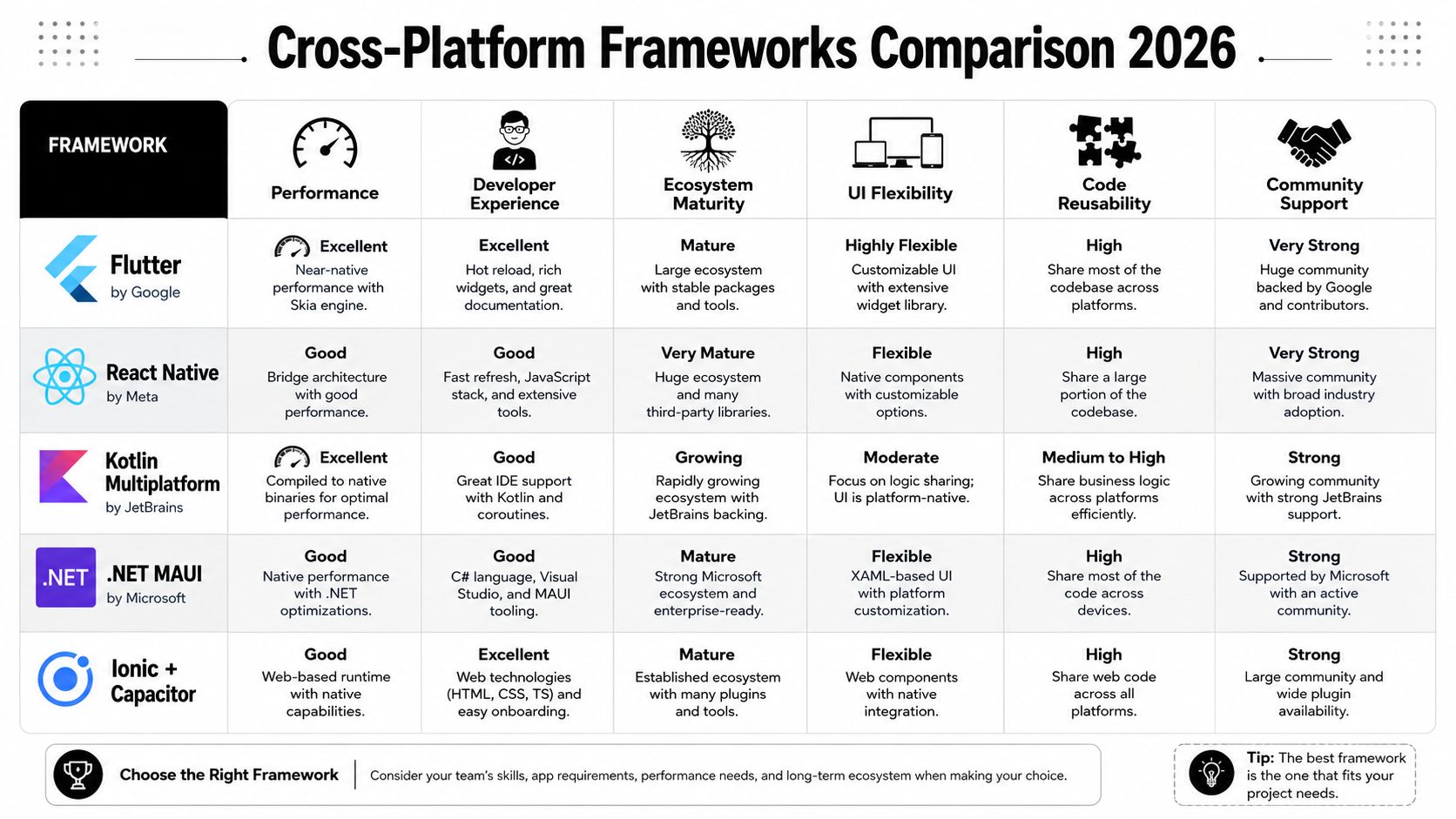
The useful comparison isn't "best framework overall." There isn't one. The useful comparison is which framework matches your team's skills, your app's rendering needs, and your long-term release model.
Early in evaluation, I prefer to compare frameworks by rendering model first. That tells you more about future constraints than any feature checklist.
What each framework is really buying you
React Native gives you a JavaScript and React-based workflow with natively rendered mobile apps. Kotlin's own documentation describes it plainly: React Native, developed by Meta in 2015, allows developers to build natively rendered cross-platform mobile apps using JavaScript and React. It's especially practical for teams that already think in component trees, state containers, and web-style iteration. See Kotlin's overview of cross-platform frameworks.
React Native is strong when your company already has React talent and wants product, growth, and engineering to move quickly on shared client logic. It's less pleasant when your app depends on custom rendering paths, heavy animation under load, or a long tail of native integrations that the community package ecosystem only partially covers.
Flutter takes a different path. It draws its own UI with its rendering engine rather than relying on native widgets in the same way. That gives teams more consistency across iOS and Android, which is useful for branded consumer apps, onboarding systems, rich paywalls, and animated feature education. Redwerk notes that Flutter enables natively compiled applications across iOS and Android using a single codebase and avoids the overhead of web-view wrappers, with rendering speeds comparable to native implementations in many cases. That's one reason Flutter fits products with custom visuals well. See Redwerk's breakdown of cross-platform tools.
Kotlin Multiplatform is often the right answer when the team wants shared business logic but doesn't want shared UI. It keeps the native iOS and Android presentation layers while sharing domain logic, networking models, validation, and state. For teams with strong native discipline, this can be the most durable compromise.
Unity isn't a general mobile app framework, but it is the default choice for cross-platform mobile games at scale. If you're building a game with liveops, in-app purchases, remote events, and parity across App Store and Google Play, Unity remains the practical default. App Radar's engine comparison notes that Unity is the default engine for iOS and Android cross-platform mobile games at scale, while Unreal Engine 5 is the top choice for cinematic 3D mobile games. See App Radar's mobile game engine guide.
Unreal Engine makes sense when visual fidelity is central to the product. For most consumer apps and many mid-complexity mobile games, it's overkill. But for high-end 3D experiences, it belongs in the conversation.
A practical comparison table
| Framework | UI Rendering | Primary Language | Best For | Key 2026 Milestone |
|---|---|---|---|---|
| Flutter | Custom rendering engine | Dart | Branded consumer apps, custom UI, animation-heavy product flows | Impeller engine standardization |
| React Native | Native rendering through framework architecture | JavaScript | Teams with React talent, shared product logic, fast iteration across stores | New Architecture migration |
| Kotlin Multiplatform | Native UI with shared logic | Kotlin | Native-first teams that want code sharing without shared UI | Growing adoption for shared business logic |
| Unity | Engine-based game rendering | C# | Mobile games, liveops, in-app purchase economies | Remains default for cross-platform games at scale |
| Unreal Engine | Engine-based high-end rendering | C++ and Blueprint tooling | Cinematic 3D mobile games | Strongest fit for premium visual fidelity |
A quick visual walkthrough helps if you're evaluating with non-engineering stakeholders:
How teams usually decide wrong
The common mistake is choosing based on developer familiarity alone.
That works for the first release. It breaks when the roadmap includes all of this at once:
- Growth requirements: remote onboarding, surveys, feature announcements, and pricing tests
- Monetization needs: subscriptions, entitlement sync, paywalls, and offer logic
- Operational needs: reproducible builds, QA across real devices, release governance
- Product design constraints: native feel in some flows, tightly branded UI in others
React Native is usually the fastest way to get a web-heavy product team productive. Flutter is usually the fastest way to make a highly designed app feel consistent across both stores.
Neither statement is universal. Both are often true.
A few framework-specific heuristics
- Pick React Native when your web and mobile teams need to collaborate closely, your app is UI-rich but not graphically extreme, and you expect lots of growth iteration.
- Pick Flutter when visual consistency matters more than platform-specific appearance and your app leans on custom interactions or animation.
- Pick Kotlin Multiplatform when your business logic is complex, your mobile org already has native depth, and you want to share logic without forcing a shared UI model.
- Pick Unity or Unreal when you're building a game first, not a traditional mobile app.
Cross platform development Android iOS works best when the framework choice lines up with the rest of the stack. If the framework and the growth layer pull in different directions, your team will feel it every sprint.
Architecting for Performance Across Platforms
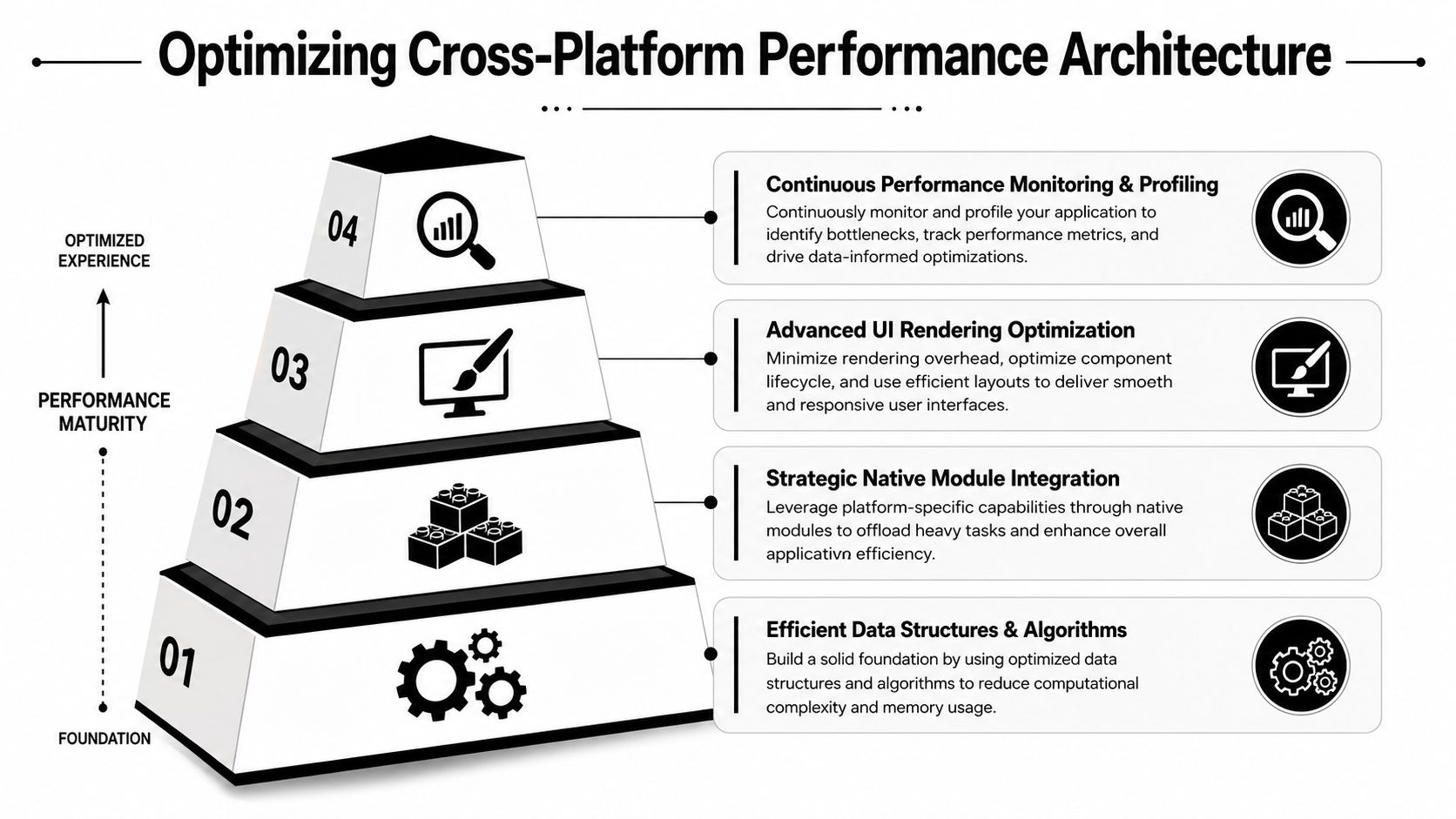
Cross-platform performance problems usually come from architecture, not from the framework name in your README.
The root issue is the abstraction layer. Shared frameworks sit between your code and the operating system. That layer improves reuse, but it also adds translation cost. On Android in particular, that overhead is measurable. Cross-platform frameworks like Flutter and React Native introduce a measurable performance overhead on Android, with empirical studies indicating that frame rates can drop by 10–15% in complex animations versus native Kotlin or Java implementations due to the abstraction layer between the framework and the Android OS, as noted in this Springer study on cross-platform mobile performance.
That doesn't mean cross-platform is slow. It means you need to decide where shared code ends.
Separate business logic from rendering pressure
Teams get into trouble when they make every layer shared by default. A better pattern is:
- Keep domain logic shared.
- Keep state management predictable and testable.
- Let high-stakes rendering paths stay framework-optimized or native.
- Move device-specific capabilities into explicit native modules.
That gives you one product brain, with more than one way to render or integrate.
A few examples:
- Checkout and entitlement rules should be shared.
- Animated hero screens should be treated as performance-sensitive.
- Platform-specific OS surfaces should remain native when needed.
- Camera, AR, or hardware-heavy flows deserve native escape hatches from the start.
Build native seams intentionally
The best cross-platform apps don't avoid native code. They contain it.
Architecture note: If a feature would be expensive to debug through a bridge, design it as a native boundary before anyone writes UI.
That applies to things like deep purchase flows, media processing, background jobs, push handling, advanced gestures, and OS-specific experiences. iOS-only features such as Live Activities or Dynamic Island support are a good example. You can still run a shared app architecture and expose those capabilities through focused native modules instead of forcing parity where parity doesn't help users.
What to profile early
Don't wait for launch week to ask whether the app feels native enough. Profile these areas as soon as the first production-shaped flows exist:
- Startup path: avoid loading every growth, analytics, and billing dependency before first paint
- Navigation transitions: watch for dropped frames when state updates, remote config, and animation all happen together
- Long lists and feeds: test image decoding, cell reuse strategy, and list virtualization
- Real-time screens: chat, live scores, multiplayer state, and rapidly updating dashboards expose weak architecture fast
A lot of jank comes from perfectly ordinary decisions. Teams parse too much JSON on the main thread. They mount too many layers at once. They let analytics and experiment evaluation fire during interactive transitions. None of that is fixed by switching frameworks.
Performance strategy that holds up
A durable cross platform development Android iOS stack usually follows this rule set:
- Share rules, not every surface: Reuse business logic aggressively. Be selective with rendering.
- Treat animation as a budget: If it affects conversion or retention, profile it on lower-end Android devices early.
- Keep native expertise on the team: Even a strong Flutter or React Native team needs people comfortable with Xcode, Android Studio, StoreKit, and Google Play Billing details.
- Measure on physical devices: Simulators help developer speed. They don't settle production performance questions.
Mastering the Cross-Platform Tooling and CI/CD Pipeline
The promise of one codebase creates a dangerous illusion. Teams assume one pipeline will also be simple.
It isn't. You still ship to two app stores, sign two build types, test against two operating systems, and debug failures that only happen on physical devices. The mismatch between framework simplicity and release complexity is where many first migrations struggle.
One trigger, multiple lanes
A useful cross-platform pipeline has a single commit trigger but separate responsibilities underneath it. Whether you use Fastlane, Codemagic, GitHub Actions, Bitrise, or a combination, keep the pipeline opinionated.
Use one lane for static analysis and unit tests. Use one for framework-specific builds. Use one for store packaging and signing. Use one for device validation. When those concerns collapse into a single giant job, failures become hard to isolate and release confidence drops.
I prefer a release flow that answers four questions in order:
- Did shared logic pass?
- Did both platform builds compile cleanly?
- Did native modules and store-specific configuration still work?
- Did the release candidate behave correctly on real devices?
That last one gets skipped too often.
Emulators are not enough
The popular pitch is faster development from a single codebase. That's often true. But the operational cost lands elsewhere. Teams often underestimate the operational cost of maintaining parallel native test matrices, and existing coverage rarely provides data on how often cross-platform teams fail launch due to device-specific bugs missed by emulators, despite advertised 30–50% faster development times, as discussed in MoldStud's FAQ on cross-platform development.
That gap shows up in familiar places:
- Push flows: notification permissions, deep links, cold starts
- Billing flows: sandbox quirks, restored purchases, interrupted transactions
- Offline behavior: cache hydration, retries, sync conflict resolution
- OEM differences on Android: background restrictions, keyboard behavior, vendor-specific rendering issues
A release pipeline isn't done when the app compiles. It's done when a real device proves the critical journeys still work.
Server-driven releases need stronger guardrails
As soon as your app starts shipping remotely configured onboarding, paywalls, surveys, feature announcements, or game liveops moments, your CI/CD process becomes more than app packaging. You're now releasing code and content on separate clocks.
That setup is powerful, but only if your governance is clear. Product and growth teams need preview environments, targeting validation, rollback paths, and analytics checks before a remote flow reaches production. If you're exploring this model, a useful technical pattern is server-driven app UI, where the client runtime stays stable while flows and presentation evolve remotely.
What to automate first
For first-time migrations, automate these before adding more sophistication:
- Build reproducibility: lock toolchain versions across local and CI environments
- Signing management: keep iOS certificates, provisioning profiles, and Play signing flows out of individual laptops
- Smoke tests on devices: one core onboarding path, one billing path, one offline path
- Release metadata validation: bundle IDs, entitlement files, feature flags, environment selection
After that, add visual regression checks, staged rollouts, and post-deploy monitoring. But don't skip the basics trying to look advanced.
Building a Unified Growth Stack for Your App
Most framework comparisons stop at UI, performance, and developer ergonomics. Production apps don't.
Once the app is live, growth becomes a daily systems problem. You need analytics that line up across platforms. You need experiments that don't fork logic in three clients. You need onboarding, surveys, feature announcements, retention offers, and paywalls to ship without waiting on another binary release. If your stack handles those as separate point solutions, cross-platform development starts losing its advantage.
The hidden fragmentation problem
A typical mobile team ends up with one SDK for analytics, another for remote config, another for paywalls, another for messaging, and native platform code for billing edge cases. Then React Native or Flutter sits above all of it. Unity or Unreal has its own path. Product asks for one onboarding journey. Engineering ends up implementing four versions.
That's where many stacks become operationally expensive, even if the app code is shared.
A better model is a unified growth runtime that can deliver in-app experiences across iOS, Android, React Native, Flutter, and game engines without forcing each framework to reinvent the same flow logic. That matters for technical teams because growth UX is now part of the product surface, not just a marketing layer.
Remote delivery has hard platform constraints
The delivery layer needs discipline. If you're shipping remote experiences or incremental updates, payload size matters. For data payload optimization in cross-platform apps, individual update payloads should remain below 2.0MB for Android and 1.0MB for iOS. Exceeding these limits can trigger background download restrictions or memory pressure, leading to failed updates, according to this architectural analysis of mobile performance optimization.
That has direct implementation consequences:
- Keep remote UI definitions compact: don't send oversized assets or nested layouts when a reusable component and local assets will do.
- Pre-bundle core creative resources: animations, icons, and structural templates should often ship with the app.
- Use remote data for decisions, not giant blobs: targeting, copy, ordering, pricing labels, and screen sequencing are usually better payload candidates than heavyweight media packages.
- Design for offline-ready fallback: if a remote flow doesn't load, the user still needs a safe default path.
What a modern growth layer should control
For mobile product and growth teams, the most valuable remotely managed experiences usually include:
- Onboarding flows: quizzes, progressive profiling, goal selection, permissions education
- Product education: feature announcements, empty-state guidance, contextual prompts
- Monetization moments: paywalls, trial messaging, win-back offers, upgrade screens
- Game operations: seasonal events, challenge prompts, reward sequences, store promotions
The important part isn't just displaying a modal. It's connecting targeting, analytics, experiments, and entitlement-aware logic so the same journey works on iOS, Android, React Native, Flutter, Unity, and Unreal.
If a growth campaign needs engineering support every time copy, logic, or sequencing changes, the stack is still too rigid.
Provider-agnostic beats lock-in
Teams should remain pragmatic. A good growth stack shouldn't require ripping out every existing system on day one. It should work with the analytics tools, billing providers, and event pipelines you already use, then gradually consolidate what makes sense.
That provider-agnostic stance matters in mature mobile stacks because the migration risk is rarely in rendering. It's in data continuity and monetization logic. If your growth layer can coexist with existing tools while standardizing experience delivery, you can improve the operating model without forcing a full rebuild.
Special cases for games and AR-heavy apps
Game teams and AR product teams need one more filter. Runtime parity has to survive network instability, frame budget pressure, and hardware variation.
Banuba's AR Try-On SDK is a good example of what to evaluate beyond feature checklists. Its cross-platform support spans iOS, Android, React Native, Flutter, and Unity, with emphasis on on-device performance and offline-ready behavior. That makes practical concerns like tracking stability in low light, fast motion behavior, and predictable licensing more important than generic "supports AR" claims. See Banuba's AR SDK comparison.
For games, the same principle holds. Liveops surfaces should behave like product infrastructure, not one-off overlays hardcoded into the client.
Managing Monetization and Entitlements Seamlessly
Cross-platform monetization looks simple in a product spec. Show a paywall. Start a trial. Activate premium. Sync entitlement.
In production, it's one of the messiest parts of the stack.
App Store and Google Play don't behave the same way. Purchase restoration, pending transactions, trial messaging, regional product setup, and billing retries all create edge cases. Add React Native, Flutter, Unity, or Unreal on top, and teams often end up with duplicated purchase logic plus inconsistent user state across clients and backends.
The model that works
Treat billing and entitlements as infrastructure, not as screen logic.
That means the app shouldn't decide premium access by checking whether the last purchase callback looked good. The app should read from a stable entitlement layer that can reconcile platform purchase data, backend state, and the current user identity. Once you adopt that model, the paywall becomes just one interface into a broader entitlement system.
A practical setup usually includes:
- Store-native purchase execution on iOS and Android.
- Server-side subscription sync so state survives reinstalls, device changes, and delayed store events.
- A single entitlement model shared across app experiences.
- Remote presentation control so pricing screens and offers can change without app updates.
Why provider-agnostic matters
Many teams already use StoreKit, Google Play Billing, RevenueCat, or custom backend services. That's fine. You don't want to replace working infrastructure just to get experiment control.
The strongest approach is provider-agnostic. The entitlement layer should work alongside existing billing data providers or replace them gradually. It also shouldn't take a revenue share on your billing and entitlement data. That pricing model matters because monetization infrastructure shouldn't punish growth.
Paywalls are important, but they're not the whole system
A lot of cross-platform conversations collapse monetization into "which paywall tool should we use." That's too narrow.
Paywalls matter because they're high-impact interfaces. But they only work well when connected to the rest of the product journey:
- Pre-paywall context: onboarding answers, feature usage, trial eligibility
- Live entitlement state: active, expired, grace period, restored
- Post-purchase routing: feature activation, confirmation, upsell suppression, retention tracking
- Experiment analysis: which experience led to conversion or recovery
If those layers are disconnected, the team ends up optimizing the screen while the entitlement system remains brittle.
Good monetization architecture makes purchase state boring. That's the goal.
One implementation habit worth keeping
Map entitlement names to product capabilities, not to store product IDs.
Store products change. Packaging changes. Promotional offers come and go. Your app logic should ask whether the user has access to premium features, advanced levels, ad-free mode, or pro tools. It shouldn't hardcode behavior around a specific SKU string.
If you're evaluating SDK options or trying to rationalize existing billing infrastructure, this overview of an in-app purchase SDK is a useful framing for what belongs in the client, what belongs on the server, and what should stay configurable.
Making Your Decision Your Cross-Platform Checklist
The right cross-platform decision usually becomes obvious once you stop evaluating only the framework and start evaluating the whole mobile system.
Some teams need Flutter because visual consistency is the product. Some need React Native because iteration speed across product and growth matters more. Some should stay mostly native and share logic selectively. Game studios often need Unity or Unreal because the rendering model decides everything upstream.
The mistake is forcing one answer before the checklist is honest.
The questions worth asking in the room
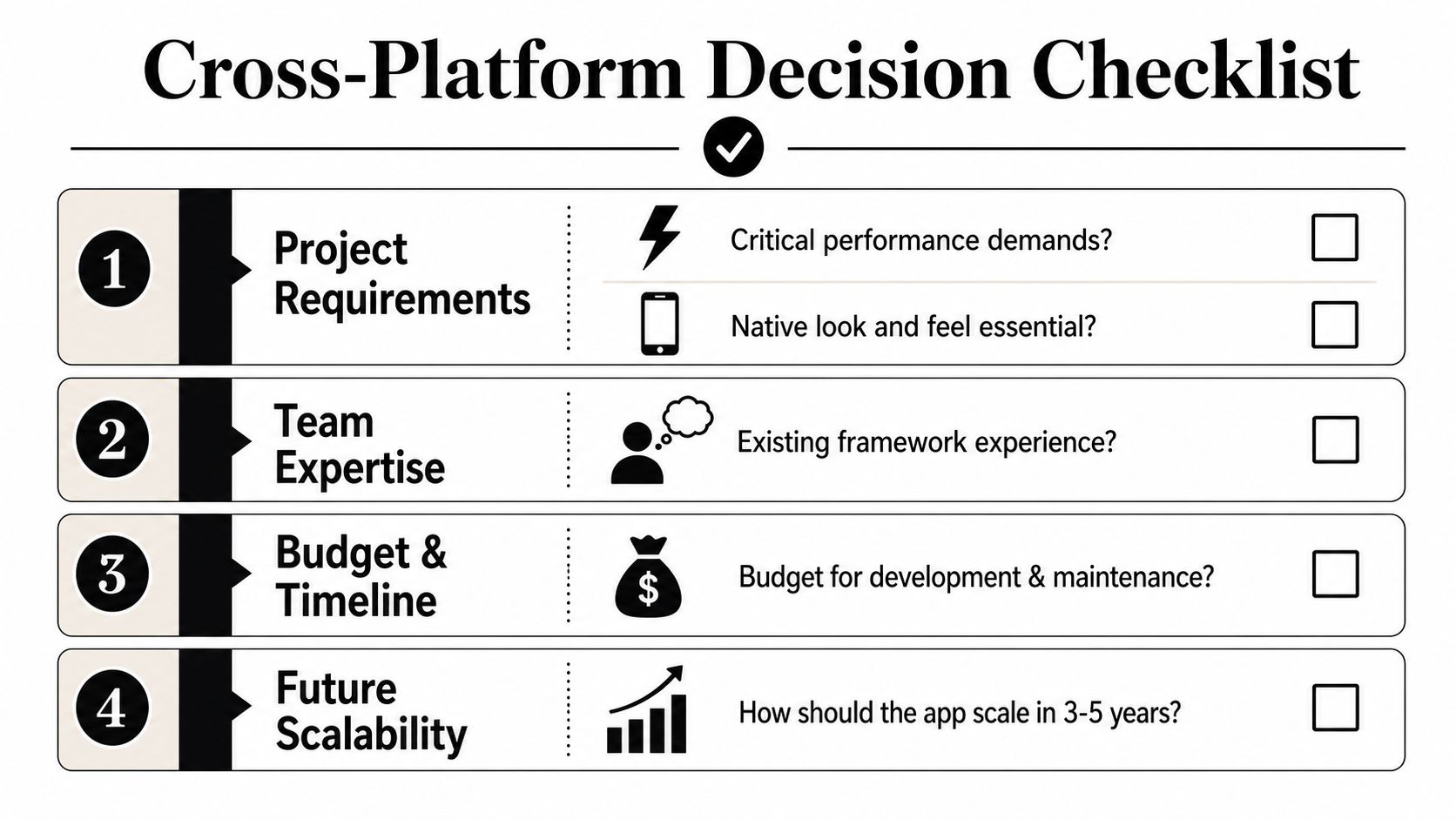
Use this list with engineering, product, growth, and monetization stakeholders together:
- What has to feel platform-native: List the features that depend on deep iOS or Android behavior. Be specific.
- What can be shared safely: Separate shared business logic from high-risk rendering paths.
- How often will product flows change: If onboarding, pricing, surveys, or announcements change constantly, remote experience delivery should be part of the architecture.
- How much native expertise will remain on the team: Cross-platform doesn't remove the need for Xcode, Android Studio, or store-specific debugging.
- How will analytics stay consistent across clients: Shared events and naming discipline matter more than framework ideology.
- What does entitlement truth look like: Decide where subscription state is resolved before implementing paywalls.
- How much offline resilience is required: This matters for sync-heavy apps, field apps, travel products, and games.
- Which real devices define success: Lower-end Android hardware often exposes architectural mistakes first.
Don't ignore battery as an unknown
One question still doesn't get answered well enough in most evaluations. How cross-platform frameworks impact real-world battery consumption remains poorly quantified, and most content focuses on UI consistency or code reuse instead of energy trade-offs, as discussed in Hooman's guide to cross-platform app development.
That means teams should treat battery as a validation task, not an assumption. Measure on target devices. Measure during long sessions. Measure while background activity, networking, animation, location, or AR features are active. If retention matters, battery behavior is product behavior.
The best choice is the one your team can operate
A sustainable cross platform development Android iOS stack has four qualities:
- It fits the product's rendering and device needs
- It supports your release and testing reality
- It connects growth and monetization from the start
- It leaves room for native escape hatches without architectural drama
That's the standard worth using. Not whether someone on the team likes one framework more than another.
If you want one system for in-app experiences, experiments, analytics, billing, and entitlements across iOS, Android, React Native, Flutter, Unity, and Unreal, take a look at Nuxie. It's provider-agnostic, works with existing tools, supports paywalls alongside onboarding, surveys, announcements, and liveops flows, and it doesn't charge a revenue-share fee for billing or entitlement data.