Maximize Revenue: App Subscriptions on Iphone Guide 2026
Master App subscriptions on iPhone for developers in 2026. This comprehensive guide covers strategies, monetization, and best practices to boost your app's
Teams usually start app subscriptions on iPhone the same way. Product wants a paywall, engineering adds StoreKit, growth wants experiments, support wants restore purchase to stop generating tickets, and finance wants one clean answer to a basic question: who should have access right now?
That's where subscriptions stop being a purchase feature and turn into an operating system for the business. The App Store transaction is only one step. The hard parts are entitlement state, renewal failures, pricing changes, cross-platform parity, and keeping iOS, Android, and game runtimes aligned when the same user moves between devices.
For mobile product, growth, and game teams, the main challenge isn't just getting a charge through Apple. It's making sure billing, analytics, in-app experiences, and access control stay consistent across native iOS, Android, React Native, Flutter, Unity, and Unreal stacks.
Why iPhone App Subscriptions Are More Than Just an API Call
A lot of teams still underestimate how central subscriptions are to the iPhone business model. On iOS, over 1.2 billion people globally subscribe to apps as of 2026, and subscriptions account for 97.5% of total App Store revenue, which makes iOS the most subscription-dependent mobile platform worldwide according to Business of Apps' Apple statistics data. The same dataset notes that iPhone users deliver 5× higher ARPU at $8.39 compared to $1.54 on Android.
That changes how you should treat implementation. A broken paywall, stale entitlement, or missing renewal event isn't a minor monetization bug. It affects the core revenue path.
The real work starts after purchase
Shipping the purchase button is the easy part. The complicated part starts once the user taps Buy:
- Access control has to stay correct: users expect premium access to activate instantly and remain accurate across reinstall, device switch, and restore flows.
- Product logic gets messy fast: upgrades, downgrades, trials, win-back offers, and region-specific pricing all create branching behavior.
- Support issues become technical issues: users often report charges they can see in payment history but can't reconcile with in-app access.
- Cross-platform teams need one answer: if your app exists on iOS and Android, or your game spans mobile and engine-based clients, entitlement drift becomes a daily risk.
A lot of subscription problems look like UX problems from the outside and data consistency problems on the inside.
Practical rule: If your team treats subscriptions as a client-only feature, you'll eventually debug revenue through support tickets.
Why a unified operating model matters
StoreKit 2 gives iOS teams a better purchase API than the older receipt-first world, but it doesn't solve orchestration. You still need a system that connects purchase events, server validation, experiments, messaging, and entitlement decisions. That's especially true when a paywall is only one part of the journey and you also run onboarding, retention offers, feature announcements, and game liveops moments.
The teams that handle app subscriptions on iPhone well usually stop thinking in terms of “billing integration” and start thinking in terms of lifecycle operations.
The Foundation of iOS Subscriptions
Before writing code, lock down the product structure in App Store Connect. Most subscription failures I see aren't caused by Swift. They start with incorrect product setup, weak naming, or a bad grouping model that makes upgrades and entitlement rules harder than they need to be.
Start with the product type
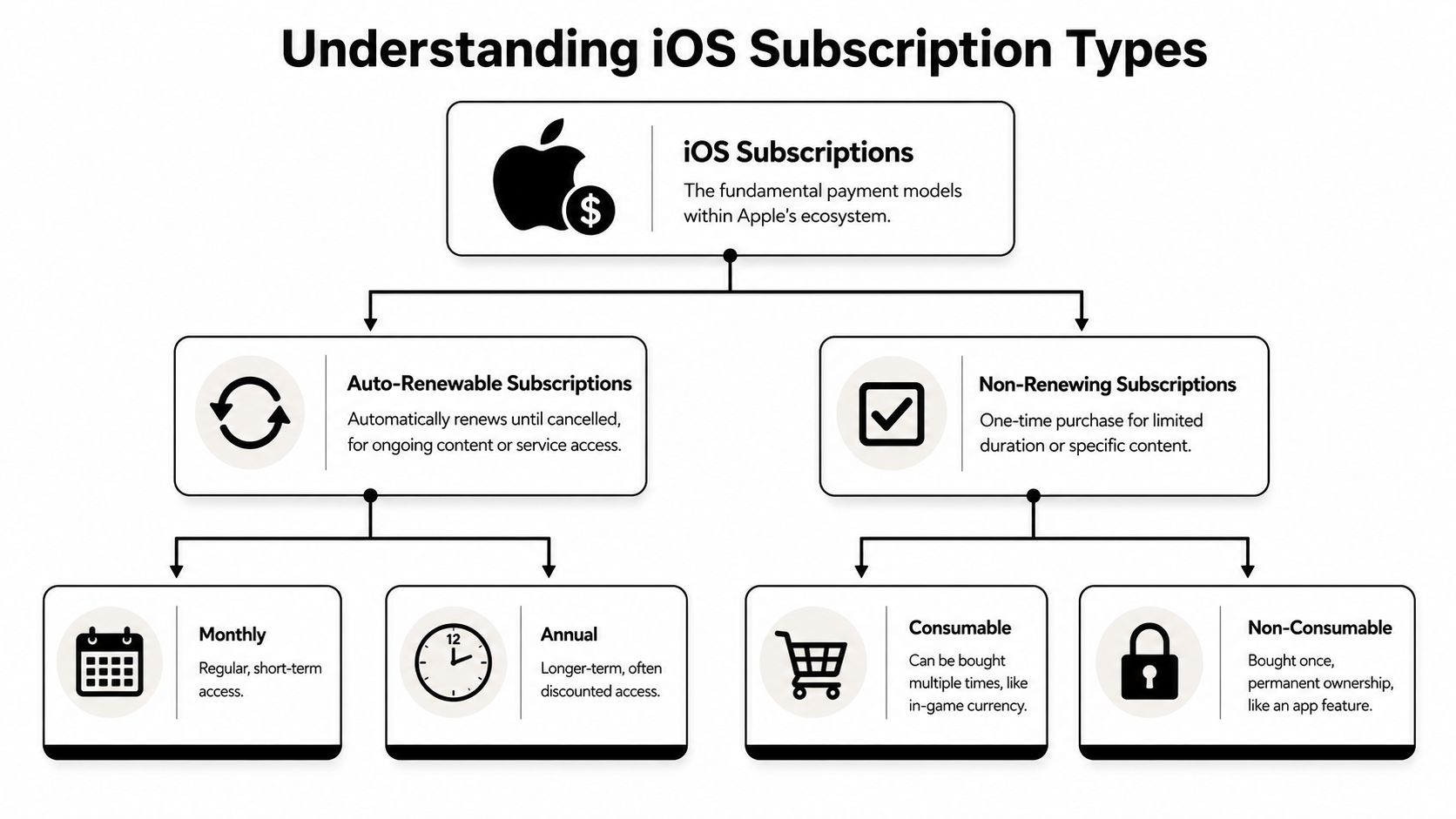
For most apps and games with recurring premium access, auto-renewable subscriptions are the right model. They continue until the user cancels and fit streaming apps, content apps, utilities, SaaS-style mobile products, and many game memberships.
Non-renewing subscriptions are different. They can work for fixed-duration access, but Apple doesn't manage the same recurring lifecycle for you. In practice, that means your backend and support burden increase.
A simple mental model helps:
| Product type | Best fit | Main trade-off |
|---|---|---|
| Auto-renewable subscription | Ongoing access, memberships, premium tiers | Requires careful App Store Connect and entitlement setup |
| Non-renewing subscription | Fixed term access you manage yourself | More custom lifecycle logic |
| Consumable | Currency, boosts, repeatable game items | Not a subscription, no persistent recurring access |
| Non-consumable | One-time unlocks | Good for permanent features, not recurring monetization |
Subscription groups are the real backbone
Apple's subscription architecture depends on Subscription Groups. This is not just an admin detail. It determines which plans are mutually exclusive, how users move between tiers, and how StoreKit presents choices.
Apple's subscription documentation is explicit that auto-renewables must be configured in App Store Connect and implemented with StoreKit APIs. It also states that if a product lacks a defined Subscription Group or localization metadata, StoreKit 2 won't list the product, which blocks the purchase flow, as documented in Apple's App Store subscriptions guidance.
If the product doesn't appear in
Product.products(for:), don't start by blaming StoreKit. Check App Store Connect setup first.
A setup pattern that works
Teams usually do better when they define structure before pricing:
Group by mutually exclusive access
Put plans that replace one another in the same subscription group.Keep product IDs boring and stable
Don't encode temporary campaign logic into IDs. Marketing copy changes. IDs shouldn't.Match entitlement names to actual access
“premium_plus” is better than “plan_b.” Support and analytics become easier to read.Localize early
Missing metadata is a classic reason products fail to surface.
The bad pattern is creating product catalogs around campaigns. The better pattern is creating a stable entitlement model, then layering offers and experiments on top.
Implementing Purchases with StoreKit 2
Once App Store Connect is correct, StoreKit 2 is a solid client-side foundation. The implementation path is straightforward on paper: fetch products, render them in a paywall, start purchase, inspect the result, then hand the signed transaction to your backend.
The catch is product strategy. Weekly plans have become the dominant revenue driver for iOS apps, contributing 46% of total app revenue, and weekly plans rose from 43.3% to 55.5% of all app subscription revenue on iOS in the last 24 months, according to TechCrunch's coverage of the 2025 Adapty report. That means your client implementation should be flexible enough to merchandise weekly, monthly, and annual products without app releases every time pricing strategy changes.
The basic StoreKit 2 flow
A practical purchase flow looks like this in Swift:
let products = try await Product.products(for: [
    "com.example.app.weekly",
    "com.example.app.monthly",
    "com.example.app.annual"
])

let selected = products.first!
let result = try await selected.purchase()
Then handle the result:
switch result {
case .success(let verification):
    let transaction = try checkVerified(verification)
    await sendToBackend(transaction)
    await transaction.finish()

case .userCancelled:
    break

case .pending:
    // Ask UI to show pending state
    break

@unknown default:
    break
}
That's enough to start a transaction. It's not enough to decide long-term access.
What to render in the paywall
The paywall should come from product metadata, not hardcoded price strings. Pull localized title, price, and subscription terms from Product. That matters for App Review, regional pricing, and future offer types.
Good client behavior usually includes:
- Display live product data: don't hardcode plan text if StoreKit can provide it.
- Handle pending states cleanly: family approval and billing states can delay completion.
- Support restore paths: users expect reinstall and device-switch recovery to work.
- Separate UI from entitlement: the client can show “purchased,” but the server should decide “access granted.”
For teams using cross-platform stacks, the same purchase concepts still apply. React Native and Flutter typically wrap native billing calls. Unity and Unreal often push billing logic through native bridges or plugin layers. The implementation details change, but the model stays the same: fetch products, initiate purchase, receive signed transaction data, then sync with a backend source of truth.
If you're evaluating SDK options for that layer, this overview of an in-app purchase SDK is a useful framing device because it separates transaction plumbing from the larger subscription system you still need to operate.
What doesn't work well
Two patterns fail repeatedly.
First, shipping a static paywall in the binary and treating pricing as release-coupled UI. Growth teams will outgrow that fast.
Second, granting premium access permanently from the device after local verification alone. That seems faster during MVP work, but it creates cleanup work the first time you need cross-device sync, support-led restores, or cancellation-aware access rules.
Server-Side Validation and Entitlement Management
The signed transaction you get from StoreKit 2 is valuable, but it shouldn't be the final authority on access. The durable authority should live on your server.
That's partly about security, but more often it's about correctness. Client-only checks break down when users reinstall, change devices, use multiple platforms, hit billing retries, or contact support after a charge appears without matching access.
The backend should own entitlement truth
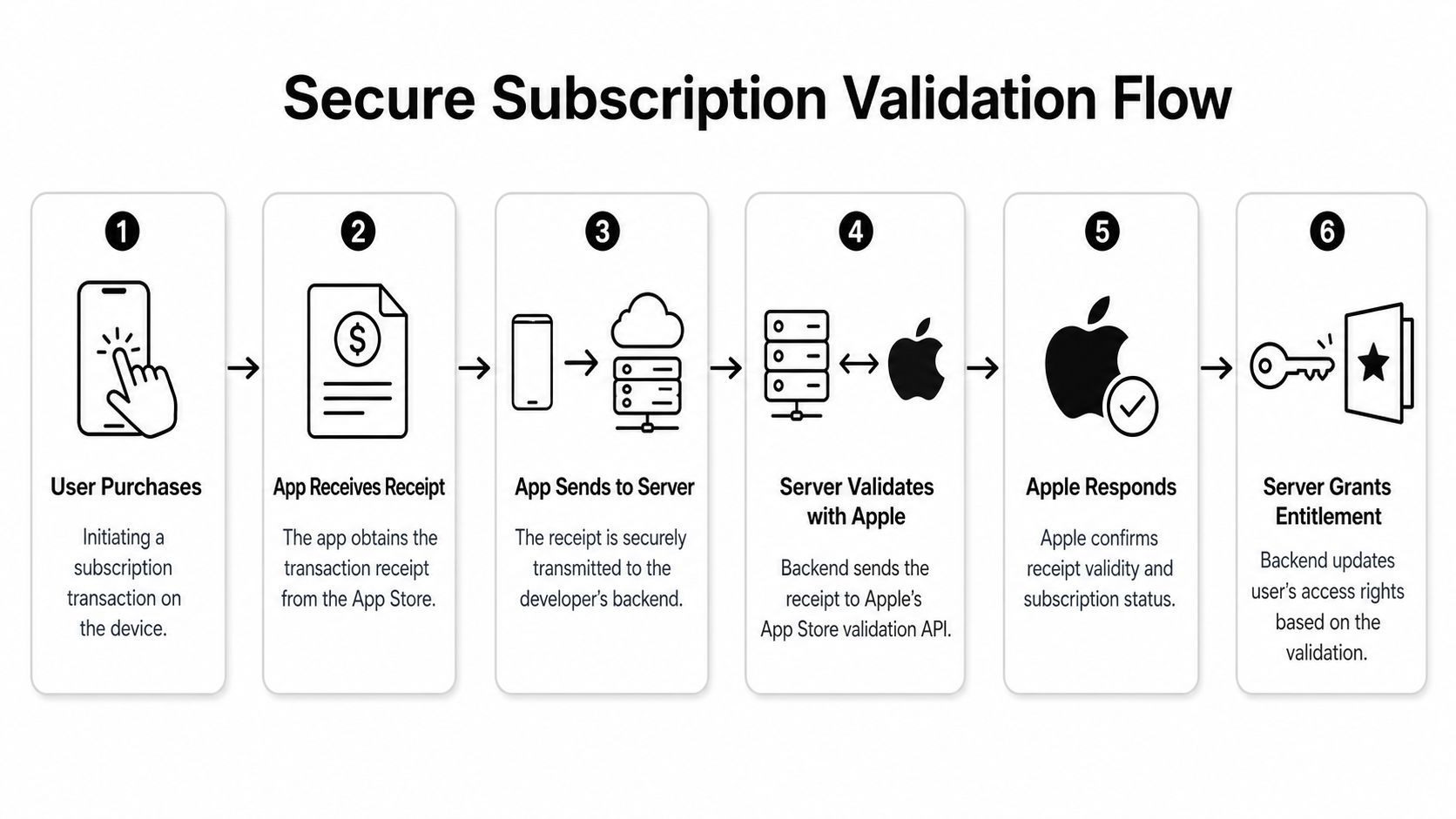
A reliable flow looks like this:
- The app completes purchase and receives a verified transaction.
- The app sends the relevant transaction payload to your backend.
- Your backend validates the purchase state with Apple and stores a normalized record.
- Your entitlement system decides what the user can access.
- Every client asks that system for access state instead of inventing its own rules.
That's the difference between a purchase implementation and a subscription platform.
The question isn't “did the user buy once on this device?” It's “what should this account be allowed to use right now?”
Why client-only access is brittle
Client-only entitlement logic sounds attractive because it reduces latency and avoids backend work. It also leaves you with several operational gaps:
- Restore becomes inconsistent: one device may gain access while another stays stale.
- Support loses observability: your team can't inspect a clean entitlement timeline.
- Cross-platform parity gets harder: Android, web, and iOS can't reconcile access state cleanly.
- Billing edge cases leak into UX: users hit lapsed or retry states that the app doesn't model well.
Even if you start with pure iOS, you'll likely need server ownership once product asks for analytics by entitlement state, growth asks for experiment segmentation, or support needs internal tools.
Build the entitlement model first
The cleanest architecture usually has three layers:
| Layer | Responsibility | Failure if skipped |
|---|---|---|
| Billing ingestion | Accept transaction and renewal signals | Missing or delayed lifecycle events |
| Validation and normalization | Convert store-specific events into one internal model | iOS and Android behave differently |
| Entitlements | Decide access for each user and surface it to clients | Feature access drifts by platform |
Many teams adopt a platform instead of building everything in-house. A provider-agnostic system can ingest purchase data, sync subscriptions, expose entitlement state to apps and dashboards, and still sit alongside existing tooling. That matters if you already use StoreKit directly, have Android billing in flight, or want to preserve current analytics pipelines.
One option in that category is app subscription management, where the billing and entitlement layer can work with or replace existing providers and doesn't take a revenue-share fee on billing or entitlement data. That's a meaningful architectural distinction for teams that want infrastructure without coupling monetization economics to vendor fees.
Treat entitlements as a product surface
Entitlement state shouldn't only drive premium screens. It should also feed growth systems, support workflows, and analytics.
For example:
- Product can target premium onboarding differently from free onboarding.
- Growth can suppress acquisition paywalls for already-entitled users.
- Support can inspect whether access is active, lapsed, retried, refunded, or restored.
- Game teams can gate liveops content consistently in Unity or Unreal while mobile clients stay in sync.
When app subscriptions on iPhone are modeled this way, billing data stops living in a silo and becomes usable across the whole app.
Managing the Subscription Lifecycle and Edge Cases
A user upgrades on Friday, loses access on Monday after a billing issue, and opens a support ticket with a valid App Store receipt screenshot. If your system only tracks "subscribed" or "not subscribed," nobody can explain what happened with confidence. Support improvises, product loses context, and engineering starts tracing state across Apple, the app, and the backend.
Renewal, retry, and lapsed states
The hard part of iPhone subscriptions is rarely the initial purchase. It is everything that happens after the first successful transaction. Renewals can fail, users can cancel but keep access until the end of the term, billing can enter retry, and App Store account issues can leave the user convinced they paid while your app shows no entitlement.
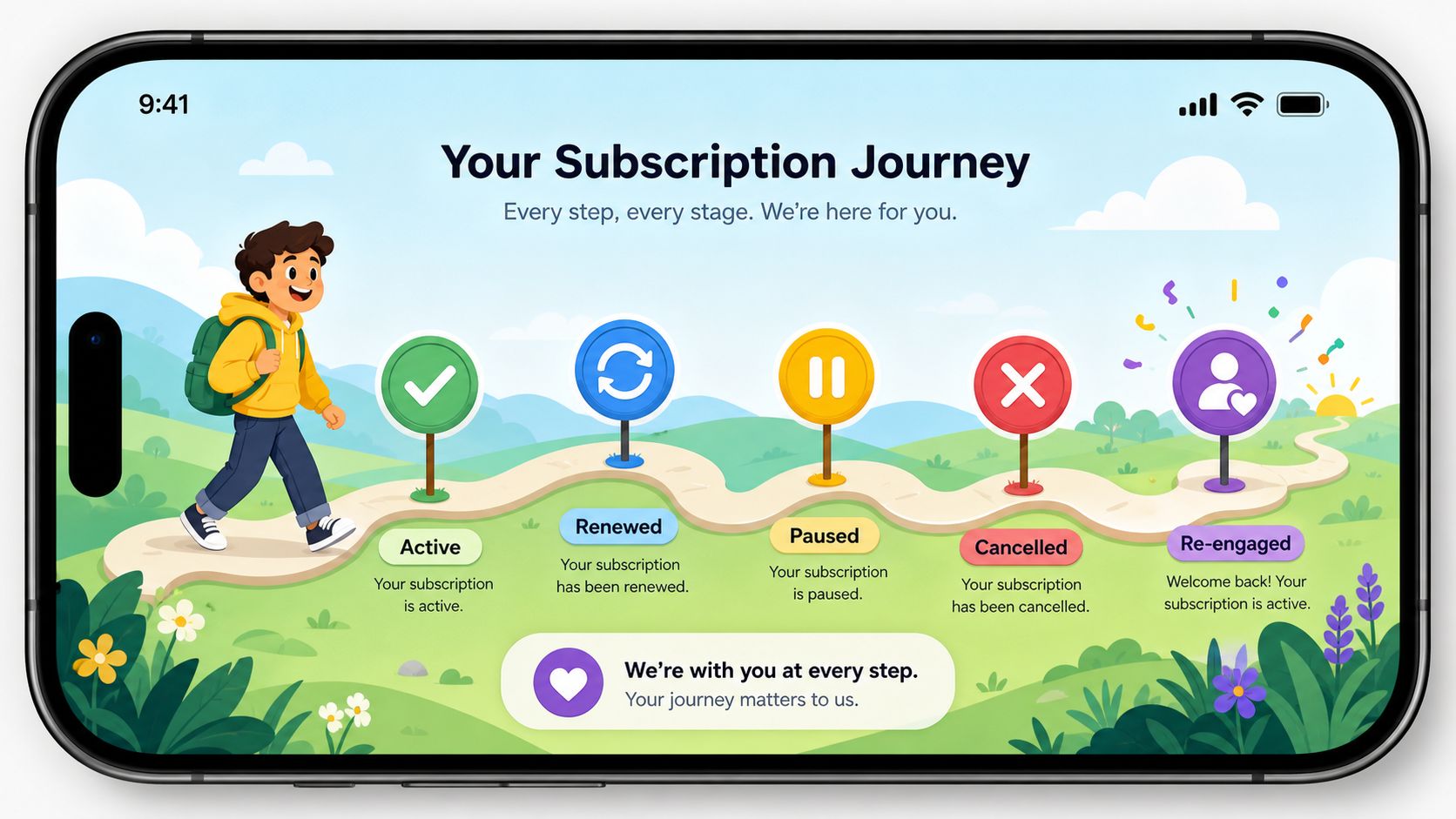
Those states need explicit handling:
- Active: access is valid and the renewal path is healthy.
- Billing retry or grace-period equivalent state: payment failed, but recovery is still possible and the user experience should reflect that.
- Cancelled with time remaining: auto-renew is off, entitlement is still active until expiry.
- Expired: access ends unless another product or platform grants it.
- Refunded or revoked: access may need to end earlier than the user expects.
Teams that collapse these into one "inactive" bucket create avoidable support work and broken lifecycle messaging. A key requirement is a state machine that maps Apple events to product behavior, backend entitlements, and support tooling. A unified platform such as Nuxie helps here because the same lifecycle state can drive app access, CRM audiences, experiment targeting, and support views instead of being reimplemented in each system.
Price changes need product handling
Price changes create a different class of edge case. Apple allows some subscription price increases without requiring users to opt in, within defined limits, as covered by Gizmodo's summary of the policy update.
The engineering work is usually small. The operational work is not.
Users need clear in-app context before they notice the change on a bank statement or renewal email. Analytics needs to separate churn after a price increase from churn caused by weak product value. Support also needs macros and visibility into which cohort saw which price, especially if you run legacy pricing alongside new offers.
Treat price changes like a release with revenue risk attached.
Hidden subscriptions and restore failures
Restore flows fail for reasons that are hard for users to understand and hard for support to verify. A subscription may appear in purchase history but not in the expected Subscriptions screen. Apple Support Community discussions show that account confusion, device state, and App Store sync problems all contribute to these cases, as discussed in this Apple Support Community thread about missing subscription controls.
That is why "Restore Purchases" should do more than re-query StoreKit. It should help your team diagnose the mismatch.
- confirm the signed-in Apple account
- verify that the product identifier is still active in your catalog
- re-sync device state with backend entitlement records
- log enough detail for support to distinguish Apple-side visibility issues from app-side entitlement bugs
This is one of the clearest build-versus-buy pressure points. A custom implementation can work, but every edge case adds another branch across client code, backend logic, analytics, and support operations. An integrated subscription platform reduces that drift because entitlement state, restore events, and customer history live in one operating layer instead of several disconnected tools.
New billing plan options add merchandising complexity
Apple has expanded the set of billing structures teams can present for subscriptions. That creates useful merchandising options, but it also increases the number of cases your paywalls, reports, and support playbooks need to understand.
A monthly billing option tied to a longer commitment, for example, changes more than pricing presentation. It affects trial framing, cancellation expectations, refund conversations, and retention analysis. A month-to-month subscriber and a subscriber on a monthly-billed annual commitment should not be lumped into the same lifecycle logic just because they see a monthly charge.
The recurring lesson is simple. Subscription operations on iPhone are not a StoreKit-only problem. They are a coordination problem across billing events, entitlements, product messaging, experimentation, and support. The more platforms you support, the more expensive inconsistency becomes.
Building a Growth Engine Around Your Subscriptions
A common failure pattern looks like this. The iOS purchase flow works, receipts validate, and entitlements update correctly. Then growth asks for paywall tests, product wants premium onboarding by plan type, support needs visibility into cancellation paths, and analytics cannot explain why one subscriber cohort retains better than another. At that point, subscriptions stop being a billing feature and become an operating system for monetization.
That is why a purchase pipeline alone is not enough. Teams need a repeatable loop across acquisition, conversion, onboarding, retention, recovery, and analysis, with subscription state feeding each step.
What to optimize beyond the transaction
MRR snapshots help with reporting, but they do not tell a product team what to change on Monday. Better operating metrics connect billing state to product behavior and user context:
- Paywall conversion by audience: a first-session user should not be measured the same way as a reactivated user or an existing free user hitting a feature gate.
- Retention by plan structure: weekly, annual, and commitment-based offers create different cancellation patterns, renewal expectations, and support load.
- Entitlement-aware feature adoption: subscribers who never reach the product's core premium value are high-risk even if billing looks healthy today.
- Cancellation journey outcomes: offboarding copy, downgrade options, and win-back timing all affect whether churn is permanent.
Value comes from acting on those signals inside the product, not just charting them for a monthly review.
Connect experiments to billing state
Many stacks start to fracture. Billing data sits in one system. Paywalls live in another. Event analytics live somewhere else. Messaging and experiments are layered on later. Every handoff creates delay, and delay matters when teams want to test onboarding flows, pricing presentation, cancellation intercepts, or premium education without shipping a new app build every time.
A unified setup reduces that coordination tax. Growth can target users by entitlement status, product can test different upgrade paths by audience, and support can see the same subscription context the app used to render an experience. That matters even more if the business spans iOS, Android, and a shared codebase where inconsistent subscription logic quickly turns into reporting drift and customer confusion.
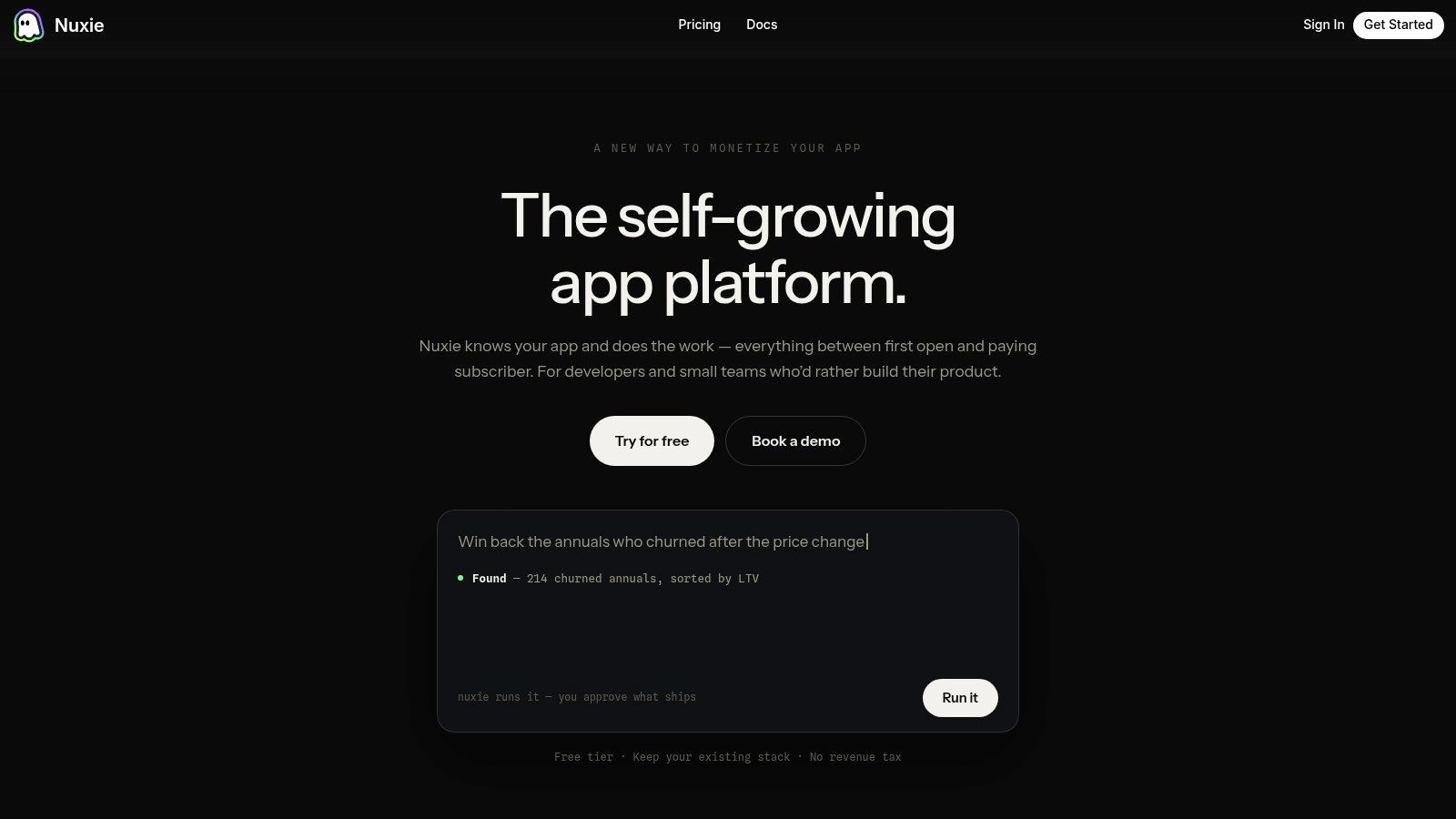
Nuxie fits that operating layer. It combines in-app experiences, experimentation, analytics, billing, entitlements, and growth tooling in one platform. It is provider-agnostic, works with existing tools, supports iOS, Android, React Native, Flutter, Unity, and Unreal, and does not charge a revenue-share fee for billing or entitlement data. For teams comparing architectural options, this breakdown of subscription management solutions across billing, entitlements, and growth tooling is a useful way to evaluate whether they need a wrapper around transactions or a broader operating stack.
Apple's newer billing plan options make that distinction more important. A monthly-billed annual commitment is not just another SKU. It changes how users read the offer, how paywalls frame commitment, how analysts compare cohorts, and how support explains cancellation behavior. If experiments, entitlement rules, and reporting are spread across separate systems, those offer tests become slower and easier to misread.
Here's a product walkthrough that shows what that kind of flow tooling looks like in practice:
Subscription growth is an experience problem
Teams that grow subscription revenue consistently usually handle three things well.
- They treat cancellation as a sequence of decisions, not a single churn event.
- They tailor premium messaging to entitlement state and observed behavior.
- They let product and growth teams ship experiments without turning each copy or layout change into an engineering project.
Billing events record what happened. The product experience influences what happens next.
Choosing Your Subscription Technology Stack
Teams commonly choose between three models.
Native only
StoreKit alone gives maximum control on iOS. If your app is simple, your team is experienced, and you don't need much experimentation or cross-platform coordination yet, this can be enough. The cost is maintenance. You own validation, entitlements, dashboards, support tooling, and every edge case.
Billing wrapper
A billing-focused layer can speed up implementation and reduce receipt-handling work. This is often the right middle ground for teams that mainly want purchase abstraction and a faster path to restore, sync, and lifecycle events. The limitation is scope. You may still need separate systems for paywalls, experiments, analytics, and in-app messaging.
Integrated growth and billing stack
A broader platform makes sense when subscriptions are part of a larger growth system. That means billing, entitlements, analytics, remote experiences, and experiments are connected from the start. For teams operating across iOS, Android, React Native, Flutter, Unity, or Unreal, this can remove a lot of duplicated work and inconsistent business logic.
If you're comparing those approaches, this guide to subscription management solutions is a useful framework because it separates transaction infrastructure from the broader operational stack teams eventually need.
The practical decision is simple. If subscriptions are a feature, native-only may be fine. If subscriptions are part of your revenue engine, your tooling has to support the whole lifecycle.
If your team wants one system for in-app experiences, experiments, analytics, billing, and entitlements across mobile apps and games, take a look at Nuxie. It can work alongside your current stack or replace parts of it, which is useful when you need to improve subscription operations without rebuilding everything at once.