Android in App Messaging: Mastering Android In-App
Android in app messaging - Build effective Android in-app messaging. Learn 2026 architecture, implementation, cross-platform SDKs, & solve delivery constraints
Nuxie pricing reviewed October 6, 2026. Creation credits have separate plan charges. The revenue fee is waived when monthly attributed revenue is at most $10,000; above that threshold, 1% applies to the full adjusted net amount. See current Nuxie pricing.
Most advice about Android in-app messaging starts in the wrong place. It starts with templates, trigger rules, or SDK setup. The harder problem is delivery. If your system only shows messages during the current session, a large share of important moments never reach the user at all.
That matters because in-app messaging is one of the highest-attention channels mobile teams have. In-app messages see a 75% open rate, which is 45 times higher than email and three times higher than push notifications, based on the Amplitude-referenced study in their guide to effective in-app messaging strategies. If the channel is this strong, losing messages to Android delivery constraints isn't a minor implementation detail. It's a growth leak.
Why Most Android In-App Messaging Fails
Many teams incorrectly frame Android in-app messaging as a presentation problem. They choose a modal, wire up a trigger, and assume the hard part is done. On Android, the harder problem is delivery under lifecycle constraints.
The failure usually starts one layer below the UI. Android can pause, recreate, or kill app state at inconvenient times. Activities are replaced. Fragments are restored out of order. Process death happens after the user leaves and comes back later. Network state shifts between foreground and background. If message eligibility, payload state, and impression tracking live only in the current session, the message system becomes unreliable the moment real user behavior shows up.
The critical issue is session-bound delivery.
A session-bound system can only show a message if four things line up at once: the user qualifies, the app is open, the correct screen is active, and the client still has the message state available. That sounds reasonable in a product spec. It breaks quickly in production. A user starts onboarding, backgrounds the app to fetch a password code, returns through a different activity, and the activation prompt is gone. The campaign did not fail because targeting was wrong. It failed because delivery depended on a fragile client moment.
Practical rule: If a message affects onboarding completion, subscription conversion, permission capture, or retention, treat it as part of the product flow state, not a disposable popup.
That decision changes the architecture. The team now needs durable eligibility rules, server-side message state, client-side caching, idempotent impression logging, suppression controls, and presentation rules that survive process death and delayed app resumes. Product owns timing and business logic. Engineering owns delivery guarantees. Growth owns targeting and experiment design. If those responsibilities are blurred, Android exposes the gaps fast.
This is also why teams that already invest in mobile app marketing automation workflows often underestimate the extra work required inside the Android app. Lifecycle messaging looks similar at the campaign level, but the delivery model is very different when the app can disappear between qualification and display.
Android in-app messaging is still a high-value channel because it reaches users in context, while intent is active and the next action is one tap away. The teams that see results use it for state transitions inside the product, not just announcements. Common examples include:
- In-flow guidance: Prompt the next setup step while the user is still in the relevant screen or state.
- Monetization prompts: Show upgrade, trial conversion, or billing recovery messages when entitlement or paywall context is current.
- Product education: Introduce a feature, permission request, or UI change at the point where the user can act on it.
Android does not make in-app messaging weak. It forces teams to decide whether they are building a real delivery system or just rendering campaigns.
Strategic Use Cases Beyond Announcements
Push is for re-entry. Email is for longer-form follow-up. Android in-app messaging is for action inside the current product context. That's why the best teams don't treat it as a broadcast layer for generic announcements.
A useful framing is simple. If the user needs to understand, decide, or convert while they are already in the app, in-app messaging is usually the right surface.
Product and onboarding flows
Onboarding is the obvious use case, but the strong pattern isn't "show a welcome modal on first open." It's stateful guidance tied to actual progress. If a user has created an account but hasn't completed setup, the message should reflect that partial state. If they skipped a key feature, the next prompt should point back to the exact missing step.
Server-driven flows are more valuable than hardcoded screens. Product and growth teams can change copy, sequencing, and branching without waiting for app releases. Teams already thinking about mobile app marketing automation usually understand this on lifecycle channels. The same principle matters inside the app.
A few patterns work especially well:
- Progressive onboarding: Start with one action, then reveal the next message after completion rather than dumping a checklist into a single screen.
- Feature discovery: Trigger education after the user reaches relevant context, not on release day.
- Survey moments: Ask for feedback after a meaningful interaction, not at random startup.
Monetization and paywalls
Paywalls are one important use case, but they shouldn't be the only lens. In-app messaging can support the entire monetization journey around the paywall.
That includes trial education, renewal reminders, win-back offers, entitlement explanations, and upgrade prompts that appear when the user hits a premium boundary. For subscription apps, the message often isn't "buy now." It's "the reason for this locked feature, what you get, and what happens next."
For games, the same logic applies to IAP moments, liveops offers, progression boosts, and event-driven promotions. The key is that the message responds to player state, inventory, progression, and timing instead of acting like a static storefront.
Teams get better results when they design in-app messages as parts of journeys, not isolated campaigns.
Support, permissions, and trust moments
In-app messages are also useful when users hesitate. If a permission request, billing issue, or entitlement mismatch creates friction, the right message can explain the next step before support tickets pile up.
Strong examples include:
- Notification education: Explain the value before the system prompt.
- Location or camera context: Ask only when the feature clearly requires it.
- Account recovery help: Guide the user through login or sync issues with contextual prompts instead of sending them to a help center article.
The strategic shift is simple. Stop thinking "announcement banner." Start thinking "decision support inside a live user state."
Robust In-App Messaging Architecture on Android
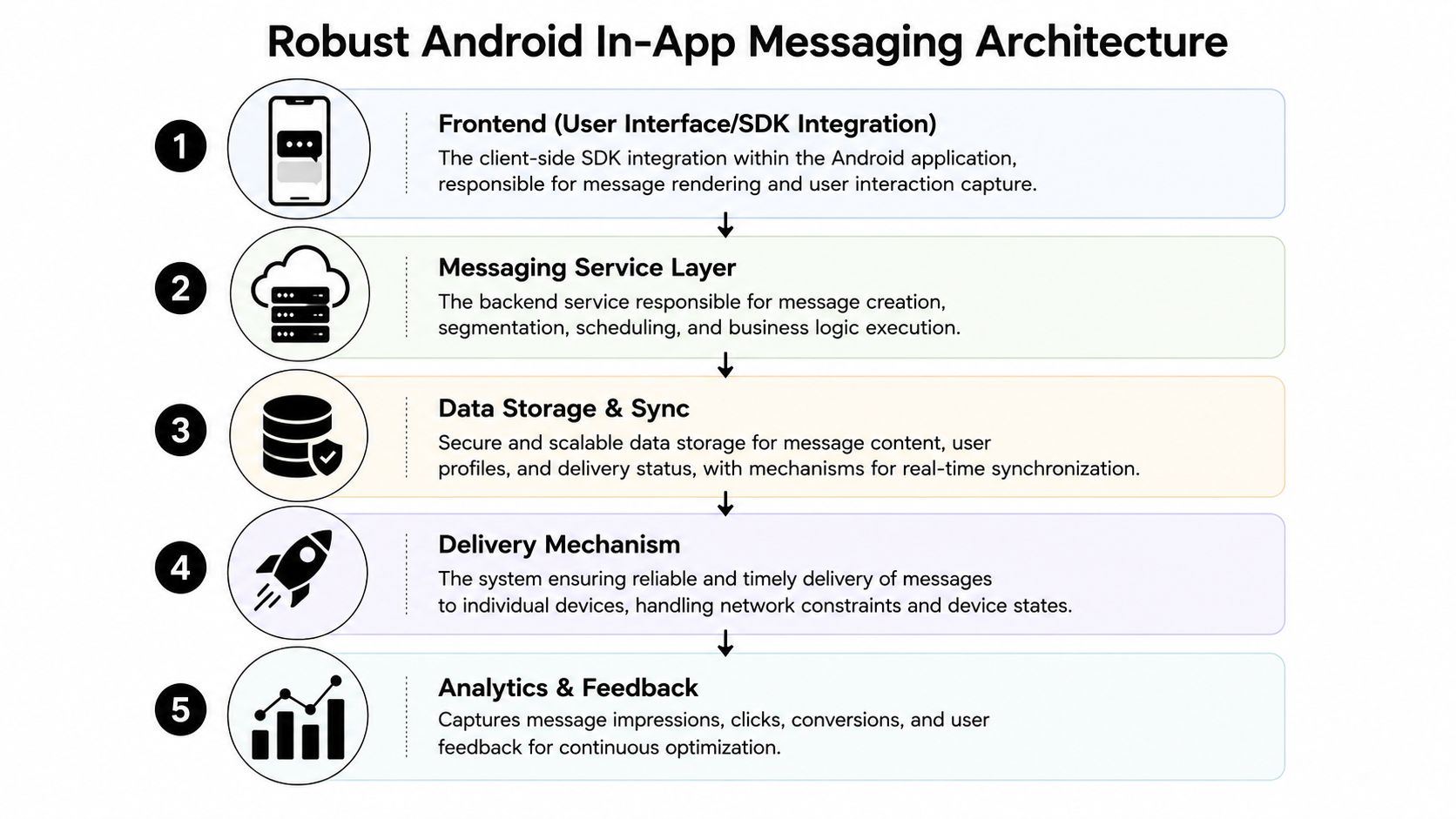
An Android messaging system is only as reliable as its state model. If the UI owns message state, you'll lose consistency during lifecycle events. If the network owns message state, you'll introduce lag, race conditions, and broken analytics. The durable model is a layered architecture with local persistence.
Official Android guidance favors a layered approach with unidirectional data flow, where the UI layer renders state and the data layer handles business logic and exposed streams. That separation helps prevent state loss during lifecycle changes such as screen rotation, and it keeps delivery state and interaction indicators consistent, as described in the Android Developers guide to app architecture.
The minimum architecture that holds up
A complete system usually has five parts:
Eligibility engine
The app decides which messages are eligible based on user state, app context, entitlement data, and suppression rules.Persistent local store
Room or SQLite stores messages, delivery status, impressions, dismissals, and pending actions.Presentation controller
A state holder decides when and where a message can render without colliding with navigation, other modals, or sensitive flows like checkout.Sync layer
Background and foreground sync reconcile campaign definitions, user traits, and event outcomes with the backend.Analytics pipeline
Impression, click, close, conversion, and downstream business events must share stable IDs across retries and app restarts.
Why local persistence isn't optional
The Android architecture guidance discussed in the referenced Android talk recommends a persistent local model so the view reflects stored state first, then syncs asynchronously. In practice, that means your message UI can update within 100 to 200ms while staying decoupled from network latency, based on the Android architecture best-practices discussion in this Android-focused presentation.
That design solves several practical issues at once:
- Cold starts: The app can restore pending messages immediately.
- Offline use: Message eligibility and dismissal state don't vanish without connectivity.
- Analytics integrity: You don't lose local outcomes if a network request fails.
- UI responsiveness: The user taps a CTA and sees immediate state change.
What this looks like in code organization
Generally, the cleanest setup is:
| Layer | Responsibility | Common Android tools |
|---|---|---|
| UI | Render current message state | Jetpack Compose or Views |
| State holder | Expose screen-safe message state | ViewModel |
| Domain | Evaluate rules and priorities | Kotlin use cases |
| Data | Persist and sync messages | Repository + Room |
| Transport | Fetch campaigns and send outcomes | Retrofit, Coroutines, Flow |
If you're building server-driven experiences, the same architecture can power more than messages. It can support surveys, onboarding flows, offer screens, and remote UI updates. That's why teams exploring server-driven app UI often end up reusing the same state and delivery primitives for in-app messaging.
Keep the renderer dumb. Put sequencing, eligibility, and recovery logic below the UI layer.
Cross-platform reality
This architecture matters even more when the app isn't pure native Android. React Native, Flutter, Unity, and Unreal teams still need a reliable local state model on Android. The rendering layer changes. The delivery problem doesn't.
If the cross-platform runtime can't persist message state natively and coordinate with Android lifecycle rules, campaign logic will behave differently across iOS and Android. Product teams notice that fast. So do growth teams when analytics don't line up.
Comparing In-App Messaging Implementation Paths
Organizations often choose between three paths. Use a basic SDK, build it themselves, or adopt a broader growth platform. The right answer depends on how much control you need over delivery, cross-platform consistency, and connected business logic.
Side-by-side trade-offs
| Feature | Firebase (Basic SDK) | Build In-House | Nuxie (Growth Platform) |
|---|---|---|---|
| Setup speed | Fast to start | Slowest | Fast |
| Android delivery control | Limited by default patterns | Fully customizable | Designed for persistent delivery workflows |
| UI customization | Basic to moderate | Full control | High, with remote editing |
| Cross-platform support | Varies by stack and integration effort | You build each stack path | Supports iOS, Android, React Native, Flutter, Unity, and Unreal |
| Experimentation | Basic | You build it | Built into the platform |
| Analytics cohesion | Separate setup often needed | You define everything | Provider-agnostic analytics workspace |
| Billing and entitlements | External tooling needed | You build or integrate | Includes billing, subscription sync, purchase data, and entitlements |
| Revenue-share fee on billing data | Depends on vendor mix | None if self-built | Creation-credit charges and an attributed-revenue fee |
| Ongoing maintenance | Moderate | High | Lower than fully custom |
| Fit | Simple campaigns | Teams with deep platform resources | Teams that want speed plus control |
When Firebase is enough
Firebase In-App Messaging can work if your use case is narrow. Think lightweight announcements, simple prompts, or teams that already accept Firebase's model and don't need deep control over persistence, monetization logic, or cross-platform parity.
It starts fast. That's the main advantage.
The limitations show up when you need:
- reliable deferred delivery across interrupted sessions
- richer UI behavior than standard patterns support
- connected analytics across app events, billing, and entitlements
- one system across native apps and game engines
When building in-house makes sense
Building your own stack is defensible if in-app messaging is a core product capability and you have mobile, backend, analytics, and growth engineering capacity. You get exactly the runtime, state model, and rendering system you want.
But the hidden cost isn't only code volume. It's operational drag. You have to maintain editor tooling, campaign QA, experiment guardrails, analytics contracts, cross-platform SDK behavior, billing integrations, entitlement sync, and rollout safety.
Custom systems usually break at the seams between mobile engineering, backend state, and growth operations.
Where a platform approach fits
A platform approach is strongest when teams need more than modal delivery. That's especially true if the same runtime should support onboarding flows, feature announcements, surveys, liveops moments, personalized screens, and paywalls.
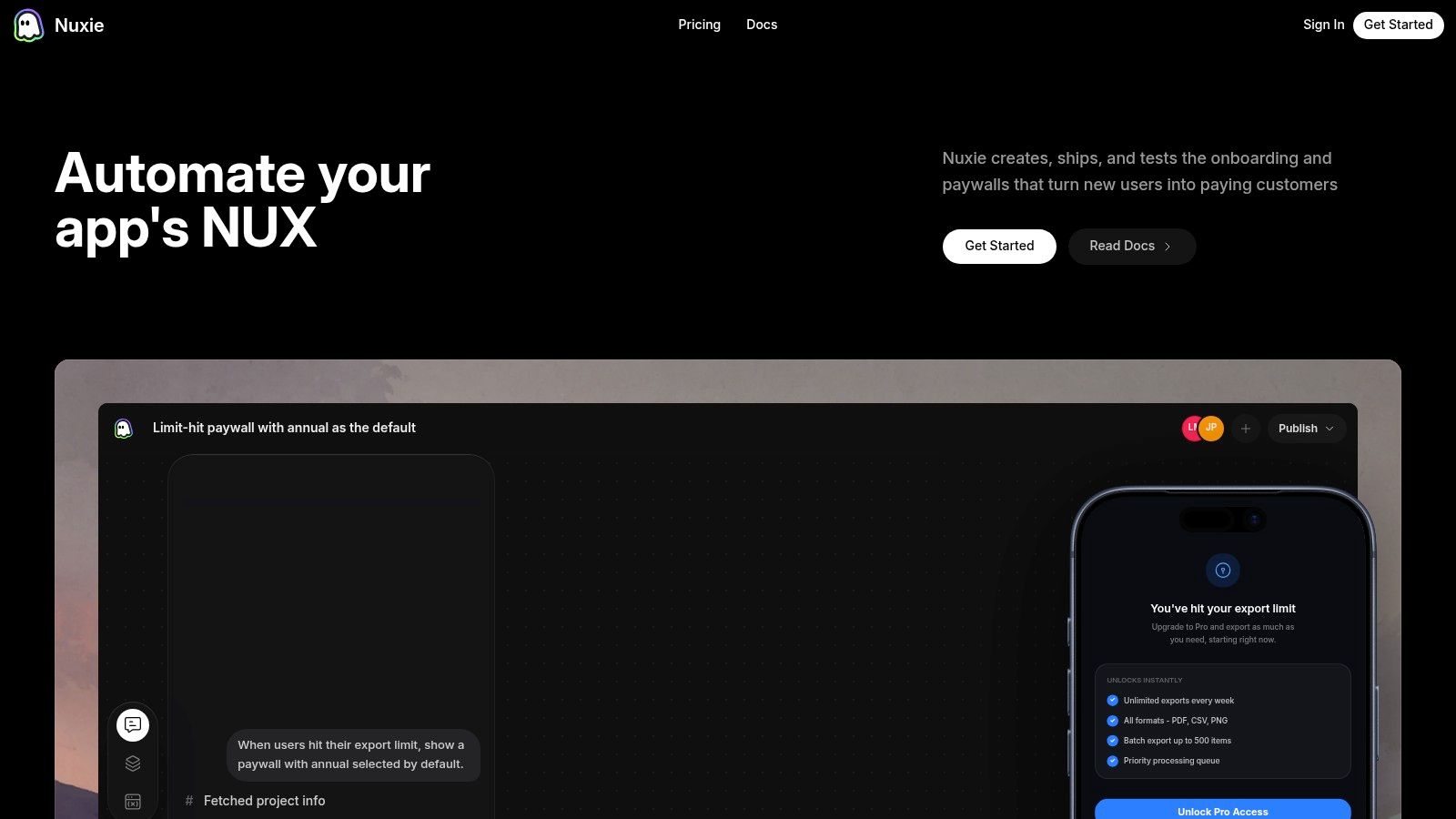
Nuxie fits that category. It's positioned as an AI-native in-app experience, experimentation, analytics, billing, entitlement, and growth platform for mobile apps and games. The practical distinction is that it can work alongside existing tools, it is provider-agnostic, and it doesn't charge a revenue-share fee for billing or entitlement data. That matters for teams already invested in StoreKit, Google Play Billing, RevenueCat, Superwall, or internal systems.
The fair way to evaluate these options is simple. If your needs are basic, a basic SDK may be enough. If your app depends on reliable delivery, remote iteration, experiments, billing-aware journeys, and cross-platform consistency, the bar is higher.
Solving Android's Critical Delivery Constraints
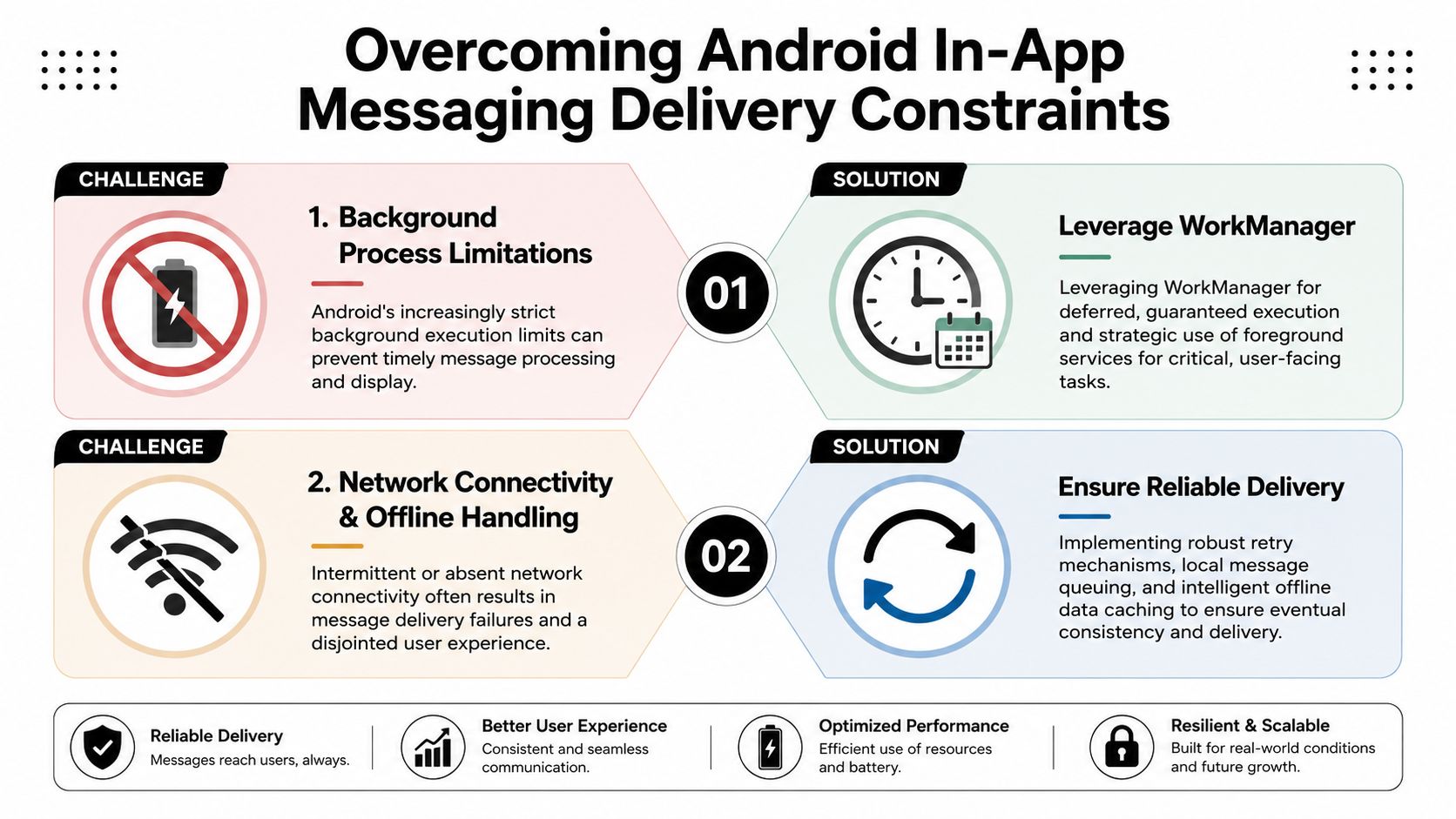
Android in-app messaging usually fails at the delivery layer, not the creative layer. Teams spend weeks refining copy, targeting, and timing, then route everything through a session-bound renderer that only works if the app stays alive and the current screen can accept an overlay. That design is fragile on Android.
Session-bound delivery needs a queue, not a trigger
A trigger-based system assumes the user is still present when the event fires. On Android, that assumption breaks constantly. The app can move to the background, the process can be reclaimed, the activity can be recreated, or the user can hit a system permission flow that interrupts your UI. If the message only exists at render time, the campaign misses its moment.
The fix is architectural. Treat each message as durable state with a lifecycle of its own. Eligibility is evaluated server-side or locally. The payload is cached on device. Presentation is deferred until the app returns to a valid state. Impression, dismiss, and conversion events are written with stable message IDs so the same campaign can resume without duplicate analytics or accidental re-entry into the wrong step of a flow.
That changes how product teams operate. A resumed onboarding prompt, upgrade offer, or feature education step behaves like part of the product, not like a best-effort popup.
Permission prompts need pre-prompts and state awareness
Android's newer permission model raised the cost of asking at the wrong time. A generic prompt on first launch wastes a request on users who have not seen the feature value yet. It also creates an analytics problem. You can measure the denial rate, but you cannot separate bad timing from weak messaging unless the prompt is tied to a specific in-app action.
A better pattern is a two-step flow. Show an in-app explanation only when the user starts an action that needs the permission. Then invoke the system dialog. If the user declines, persist that outcome and change the journey. Offer a reduced-function path, a reminder later, or a settings recovery screen instead of asking again blindly.
Three examples hold up well on Android:
- Notifications: Ask after the user enables alerts, follows a topic, or requests a reminder.
- Location: Ask at map entry, store finder, or nearby discovery, not during account creation.
- Camera or microphone: Ask at capture time, after the UI already makes the purpose obvious.
Delivery mechanics that survive real Android behavior
The Android stack needs a few safeguards before in-app messaging becomes dependable:
- Persistent local storage: Cache campaign payloads, eligibility windows, and user progress so process death does not erase pending messages.
- Resume-aware evaluation: Re-check display conditions on app foreground, activity recreation, and key screen transitions.
- Safe background work: Use Android-approved job scheduling for sync, expiry cleanup, and event replay instead of custom background services.
- Presentation arbitration: Prevent collisions with checkout, gameplay, consent flows, OS dialogs, or any screen where interruption would hurt conversion.
- Idempotent analytics: Record impressions and actions with stable identifiers so retries and replays do not inflate reporting.
I have seen teams ship a polished campaign system and still miss conversions because the renderer had no memory. Android punishes that shortcut.
Platforms built for this problem treat in-app messages as resumable experiences rather than temporary overlays. That is one of the more important distinctions with Nuxie. It is designed to coordinate delivery state, experimentation, billing-aware journeys, and cross-platform behavior without forcing teams to rebuild the queueing, resume logic, and guardrails themselves.
If a message matters to activation, monetization, or retention, it cannot depend on a single uninterrupted session. On Android, reliable delivery starts with that constraint.
Best Practices for Message Design and Targeting
Good delivery gets the message on screen. Good design gets the user to care. Most underperforming in-app campaigns fail here because they look like system interruptions rather than parts of the product.
Design for interaction, not decoration
A message should match the intensity of the moment. Full-screen takeovers make sense for a paywall, major onboarding branch, or retention offer. They are excessive for a feature tip. Lightweight cards, tooltips, or embedded panels often perform better because they preserve context.
Rich media helps when it clarifies the action. MessageGears reports that adding a single emoji can increase engagement by 40% and an image can boost engagement by up to 650% compared with text-only messages in its guide to in-app messaging best practices. That doesn't mean every prompt needs visual garnish. It means static text-only overlays are often leaving attention on the table.
Three design rules hold up across apps and games:
- One job per message: Ask for one decision. Upgrade, enable, continue, rate, claim, or learn.
- Native motion and feedback: Use animation carefully. Rive-powered interactions can make onboarding, reward reveals, and premium explanations feel integrated instead of bolted on.
- Respect interruption cost: Don't stack messages, and don't block users during sensitive tasks.
Target the current user state
Segmentation alone isn't enough. The strongest campaigns use behavioral triggers, local state, and suppression rules together.
A practical targeting model looks like this:
- Audience layer: New users, trial users, payers, churn-risk cohorts, high-value players.
- Behavior layer: Completed tutorial, viewed premium feature, failed purchase, reached level checkpoint.
- Context layer: Current screen, connectivity state, entitlement status, cooldown windows.
That combination matters across iOS and Android, but it's especially important for Android because timing errors are more expensive. If you miss the context, the OS and lifecycle won't save you.
A short demo helps when teams are building richer in-app experiences and want to see how motion and interaction can feel in practice.
What usually doesn't work
Plain startup modals, generic permission education, and repeated feature nags are easy to ship and easy for users to ignore. So are campaigns that don't account for billing state, entitlement mismatches, or game progression.
The highest-performing Android in-app messaging programs behave more like product systems than marketing overlays.
Measuring Success and Selecting Your Solution
Android in-app messaging should be judged like a product system, not a campaign channel. A high send count can hide a critical failure mode on Android: messages that were technically triggered but never shown in the right session, on the right screen, or at a moment when the user could act.
Measure success across four layers so product, engineering, and growth teams are looking at the same system from different angles:
- Delivery quality: Eligible, queued, rendered, deferred, expired, retried, or dropped.
- User response: Impression, tap, dismiss, CTA completion, and downstream follow-through.
- Business impact: Onboarding completion, feature adoption, trial start, purchase completion, retention, and liveops participation.
- System health: Behavioral parity across iOS, Android, React Native, Flutter, Unity, and Unreal, plus time-to-launch for non-code changes.
The first layer is the one Android teams under-measure. If the analytics model starts at impression, it misses the architectural problems that suppress growth. Teams need to know how many messages were eligible but blocked by lifecycle state, delayed until the user left the target surface, or dropped because local context changed before render. That instrumentation is what separates a messaging feature from a delivery system.
As noted earlier, timing permission and conversion prompts around real behavior changes results dramatically. That is a measurement problem as much as a targeting problem. If the platform cannot connect event capture, eligibility, suppression, and rendering inside the active session, the experiment results will look worse than the creative is.
A practical selection filter is straightforward:
- Choose a basic SDK if in-app messages are low-risk, mostly informational, and missed delivery does not affect a key funnel.
- Build in-house if messaging is tied to your core product loop and you are prepared to own client runtime, QA across Android device states, analytics schema, experimentation, and cross-platform parity.
- Choose a platform if you need remote publishing, behavioral triggers, entitlement-aware targeting, experimentation, and delivery controls that survive the quirks of Android sessions.
The trade-off is not only cost. It is operating model. A lightweight SDK is cheap to add and expensive to mature. A custom build gives control, but it also gives your team a permanent backlog of rendering bugs, event drift, and platform-specific edge cases. A purpose-built platform makes sense when in-app messaging sits close to monetization, onboarding, or retention and cannot afford silent delivery failures.
Teams comparing vendors should also examine category scope. An in-app experience platform replaces more than a message composer in many stacks. It can replace the disconnected mix of messaging tools, paywalls, analytics, experiments, and entitlement logic that often breaks state coordination on Android.
Nuxie brings those layers together in one AI-native platform for mobile apps and games. Teams use it to ship in-app experiences, experiments, analytics, billing, entitlements, paywalls, surveys, onboarding flows, and liveops moments across iOS, Android, React Native, Flutter, Unity, and Unreal without waiting on app releases. If your Android in-app messaging strategy needs durable delivery and provider-agnostic data, take a look at Nuxie.