Mobile App Marketing Automation: Your 2026 Playbook
Build your 2026 mobile app marketing automation playbook. Get a step-by-step guide for technical teams on strategy, workflows, personalization & avoiding fees.
Nuxie pricing reviewed October 6, 2026. Creation credits have separate plan charges. The revenue fee is waived when monthly attributed revenue is at most $10,000; above that threshold, 1% applies to the full adjusted net amount. See current Nuxie pricing.
You've probably seen the pattern already. The app is live, installs are coming in, and the first session looks healthy. Then Day 3 arrives and the funnel starts leaking. New users stall in onboarding, mid-value users stop coming back, and the paywall converts only when traffic quality is unusually strong. The static experience you shipped is doing exactly what static experiences do. It treats everyone the same.
That's why mobile app marketing automation has shifted from a messaging problem to a product systems problem. The teams getting better retention and monetization aren't just sending more push notifications. They're wiring behavior, entitlement state, attribution, experimentation, and in-app delivery into one loop that can react in real time, even when the device is offline.
The practical question isn't whether to automate. It's how to build an automation stack that product, growth, and engineering teams can effectively operate across iOS, Android, React Native, Flutter, Unity, and Unreal. It also has to respect margin. If your “all-in-one” growth stack subtly takes a cut of the subscription or IAP revenue it helps influence, your ROI model is already distorted.
Teams that want a broader view of what an in-app experience layer should cover usually start with an in-app experience platform rather than treating automation as a notification tool.
Introduction
Automation works when you treat it as a multiplier for core app loops, not as a cost center attached to CRM. In practice, that means every workflow needs to tie back to activation, retention, or monetization. If it doesn't move one of those, it's operational noise.
The mistake I see most often is starting with channels. Teams debate push versus in-app versus email before they've defined the user state they want to influence. That sequence is backwards. First define the funnel moment. Then define the trigger. Then pick the delivery surface that fits the context.
Practical rule: Automate user-state transitions, not calendar-based campaigns.
A strong program starts with a small set of business goals that are specific enough for product and engineering to implement. For a game, that could mean reducing early drop-off after the tutorial, increasing return sessions among lapsing spenders, or improving conversion from first shop visit to first purchase. For a subscription app, it could mean lifting onboarding completion, recovering users who viewed a paywall but didn't subscribe, or increasing usage before trial expiry.
Once those goals are clear, the rest of the playbook gets simpler. You can define events, build segments, decide where on-device logic matters, and run experiments that produce useful answers instead of dashboard clutter.
Defining Your Automation Strategy and KPIs
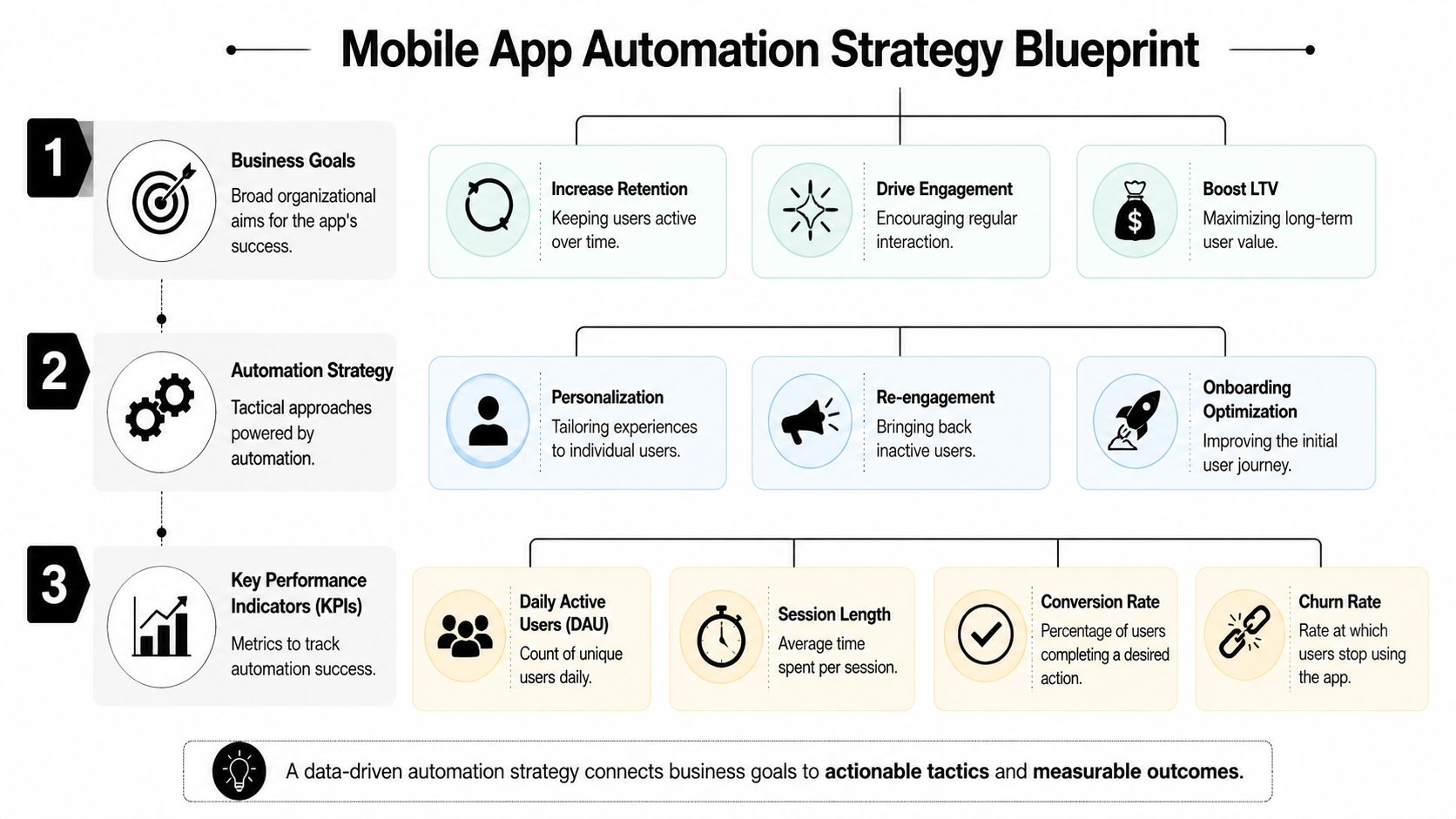
Monday morning. UA just delivered a spike of paid installs, product wants onboarding fixes, and finance is asking why payer conversion did not move. If the automation plan is still written as “improve retention” or “increase revenue,” the team has nothing they can ship. Strategy has to resolve into event rules, segment logic, delivery priorities, and one KPI per workflow.
The framework I use is the segmentation-trigger-optimization loop. It gives product, data, CRM, and engineering the same operating model without pushing the team into bloated all-in-one tooling. That matters if you want an offline-ready stack and want to avoid revenue-share pricing that subtly taxes growth as volume scales. In practice, the strategy should be portable across Braze, OneSignal, Firebase, a warehouse-first setup, or your own messaging layer. The workflow logic should belong to your team, not to a vendor contract.
Start with lifecycle KPIs
Treat activation, retention, and monetization as separate operating problems. Each needs a primary KPI, a trigger window, and a clear owner.
| Lifecycle stage | What to measure | Example automation focus |
|---|---|---|
| Activation | Onboarding completion, early feature adoption | First-session guidance, quiz-based routing |
| Retention | Return behavior, repeat sessions, drop-off recovery | In-app re-engagement, reminder flows |
| Monetization | Trial starts, purchase starts, subscription conversion | Paywall timing, offer logic, entitlement prompts |
For gaming teams, segment design should reflect play cadence, economy behavior, and progression friction. Install source still matters, but it rarely tells you enough to automate well on its own. A useful segment is something your CRM and data teams can define with live event logic, such as “store viewers with two failed purchase attempts in the last seven days” or “high-value users whose session cadence dropped 40% week over week.”
For subscription apps, one of the highest-intent groups is still users who saw the paywall and did not convert. They should not sit in the same pool as every other non-subscriber. The treatment usually changes based on timing, value framing, and whether the user hit the paywall from a strong intent path or from a generic prompt.
Build segments from behavior your stack can actually support
Good segmentation is constrained by data quality and implementation reality. If your iOS app logs paywall_view, Android logs subscription_page_open, and your web paywall logs nothing when the device is offline, the segment looks clean in a slide deck and breaks in production.
That is why I prefer segment rules that map directly to stable event definitions and sync behavior. Session frequency above three times per week, shop visit with no purchase, level fail streaks, ad view completion, paywall exposure without trial start. Those are operational rules. Teams that need a reference point for keeping event names and properties consistent usually maintain an internal spec alongside implementation docs such as this mobile analytics event taxonomy guide.
The execution layer matters as much as the segment definition. Event listeners need to capture intent signals reliably across app states, including weak connectivity and delayed sync. If your stack depends on a vendor SDK that drops events offline or gates advanced segmentation behind usage-based pricing, you pay twice. First in data loss, then in fees.
Teams usually overestimate how much segmentation they need and underestimate how much event cleanup they need.
Industry reporting has pointed to poor data quality and strategy misalignment as common reasons automation programs underperform, including analysis from Invoca on why marketing campaigns fail. The practical lesson is simple. Do not create fifty micro-segments before you can trust ten core events.
Keep the strategy narrow enough to test
Early on, three workflows are enough to prove the system works and that your data is good enough to trust.
- Activation flow: Trigger on stalled onboarding and drive the user to the next meaningful action.
- Retention flow: Trigger when a previously active user misses expected session patterns.
- Monetization flow: Trigger when a user shows buying intent but exits before purchase.
Each workflow should have one success metric and one guardrail metric. For example, an activation flow can optimize onboarding completion while watching D1 retention. A monetization flow can optimize purchase start to purchase completion while watching refund rate or churn. That sounds obvious, but teams skip it and end up shipping flows that raise click-through while hurting long-term value.
For test design, volume matters more than teams want to admit. Small segments produce noisy reads, especially in monetization where baseline conversion is low. Use a sample size calculator before calling a segment “testable,” such as the Evan Miller A/B test sample size calculator, and cut segments that cannot reach significance in a reasonable time window.
A tight strategy does more than make reporting easier. It keeps the automation layer portable, keeps costs predictable, and lets the team build logic once across push, in-app, and offline-safe queues instead of rebuilding the same journey inside every vendor UI. That is usually the difference between an automation program that scales with the game and one that gets more expensive every quarter.
Architecting Your Data Layer for Automation
A lot of automation stacks look fine in a demo, then break the first time the app goes offline, an SDK drops events, or finance asks why message volume now carries a revenue-share tax. The data layer decides whether automation stays portable and cheap, or gets trapped inside one vendor's UI with bad attribution and rising fees.
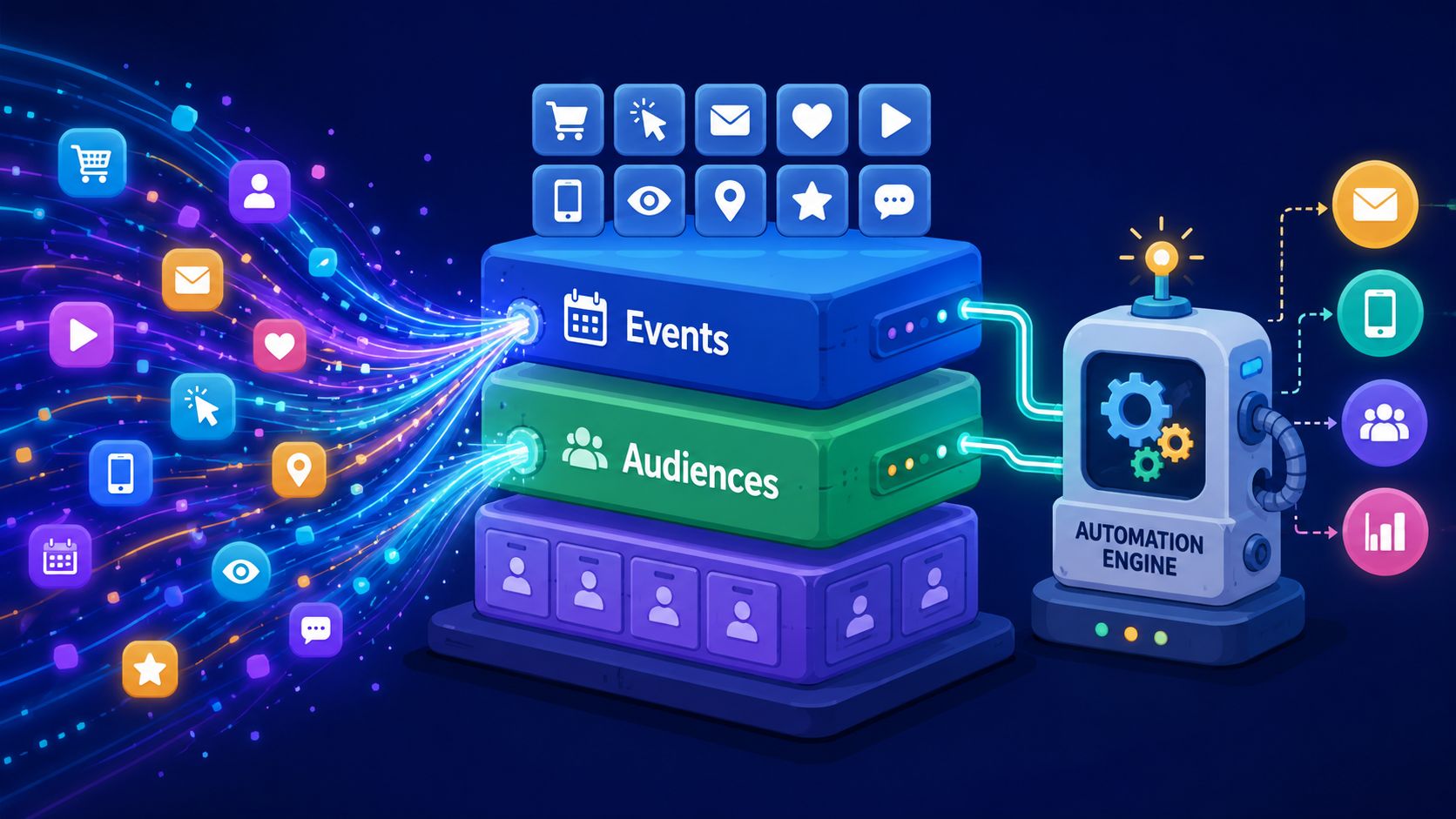
For mobile games, I want one event model across iOS, Android, Unity, and any wrapper layer such as React Native. I also want it to survive weak connectivity. That usually means a client event queue, idempotent server ingestion, a warehouse that owns the truth, and an engagement layer that reads audiences from that source instead of reinterpreting raw events inside every tool. Teams that need a reference for naming and property structure usually keep an internal spec aligned with implementation docs like events and taxonomy guidance.
The build versus buy trade-off is straightforward. Vendor suites are faster to launch, but many add hidden costs through revenue-share pricing, proprietary audience logic, and limited offline handling. A unified stack takes longer to set up, yet it gives the team control over identity resolution, message eligibility, and monetization data. That matters when purchase events, ad revenue, and entitlement changes need to flow into the same decisioning system without paying a percentage of the upside back to the vendor.
Three workflows that expose bad data fast
The fastest schema review is not a spreadsheet audit. It is running real lifecycle use cases against the event model and seeing where logic falls apart.
Onboarding workflow.
A player finishes session one, completes two tutorial steps, then drops before account creation or core progression access. That flow needs ordered events such as onboarding_step_completed, a stable step_name property, session timestamps, and a way to distinguish fresh installs from reinstalls. If one platform logs tutorial_done and another logs onboarding_complete, the audience breaks immediately.
Retention workflow. A previously active user stops showing expected play patterns. This workflow depends on clean sessionization, timezone handling, and a consistent user ID after login state changes. In practice, teams frequently discover duplicate profiles, late-arriving events, and push tokens tied to the wrong account.
Monetization workflow.
A user views a paywall, checks an offer, and exits. To automate that well, the stack needs paywall_view, offer metadata, entitlement state, purchase start, purchase success, and refund or cancel events from the store server. If those arrive from different systems with mismatched IDs, the team cannot tell the difference between purchase hesitation and a tracking bug.
Taxonomy rules that save engineering time
A few rules prevent months of cleanup later:
- Use stable verbs:
viewed,started,completed,dismissed, andpurchasedhold up better than channel-specific labels. - Keep properties portable: define
platform,placement,offer_id,price_variant, currency, and entitlement state the same way across SDKs and backend events. - Separate facts from audience logic: log
session_startandlevel_completed. Compute “high spender,” “at churn risk,” or “whale candidate” downstream. - Version your schema: event definitions change. Track that change deliberately so old app versions do not poison current audiences.
- Design for offline capture: queue events locally, stamp client and server time, and dedupe on ingest. Mobile sessions are messy. The pipeline has to expect that.
AI features can help after the inputs are reliable. Predictive churn models, send-time optimization, and generated message variants are only as good as the event history behind them. Without clean IDs, consistent timestamps, and trustworthy monetization signals, those systems produce segments that look plausible but drift enough to hurt targeting.
Bad event design rarely fails in an obvious way. It shows up as a win-back audience that includes active payers, an onboarding prompt sent after completion, or revenue that does not reconcile with the store.
That is why I prefer dynamic audiences sourced from current warehouse-backed behavior over static CSV exports from an analytics tool. A unified, offline-ready stack costs more engineering time up front, but it keeps campaign logic portable, avoids revenue-share fees tied to monetization lifts, and gives the growth team one place to debug retention and purchase journeys when performance drops.
Building High-Impact Automation Workflows
A player installs after seeing a rewarded ad, finishes the tutorial on spotty hotel Wi-Fi, ignores the first offer, then comes back two days later from a push. If your automation stack treats those as disconnected moments, the user gets generic messaging, the paywall repeats, and retention drops for reasons the team cannot diagnose quickly.
That is why workflow design has to behave like product design with growth constraints. The job is not to send more campaigns. It is to decide which experience should run for which user, at which moment, with logic that still works when the device is offline and without handing a vendor a percentage of monetization lift.
Fixed send calendars still exist, but high-performing mobile teams have shifted to event-driven workflows because they map better to session behavior, paywall exposure, and return patterns. Braze's guide to trigger-based messaging outlines the same shift toward behavior-based orchestration and away from rigid batch schedules in mobile lifecycle programs (https://www.braze.com/resources/articles/triggered-emails-vs-scheduled-emails). In practice, that means onboarding steps, comeback offers, and paywalls update from remote logic instead of waiting on an app release or a weekly campaign calendar.
Workflow one intelligent onboarding
Good onboarding sorts users fast enough to change what they see in session one or two.
In games, I usually start with a lightweight branch based on install source, first-session depth, and one explicit preference signal such as play style or goal. A PvP-motivated player should not get the same early prompts as a collector or economy optimizer. The branching logic does not need to be fancy. It needs to identify intent early, avoid slowing the first session, and write the result back so every later workflow can use it.
Subscription and utility apps can apply the same pattern. If a user arrives from a productivity-focused ad set and immediately checks templates, show setup shortcuts and a feature demo. If they open gated features in the first minute, test an earlier paywall or trial prompt. If they stall before activation, shorten the path and remove education they already signaled they do not need.
The trade-off is complexity. Every new branch increases QA load, copy requirements, and analytics maintenance, so I prefer a few durable paths over a dozen thin variants no one can tune.
Workflow two churn prevention
Churn prevention works better when it reacts to broken habits, not calendar milestones.
For a game, that usually means defining a normal cadence by cohort, then triggering intervention when a user falls below it. A user who played five sessions a week and suddenly goes quiet needs a different treatment than a user who never formed a habit. The first group may respond to a comeback reward, an event reminder, or a social prompt tied to clan activity. The second group often needs a simpler re-entry path, such as a resumed quest, a skipped tutorial recap, or one clear reason to play now.
Push gets the return visit. In-app closes the loop once the session starts.
The mistake I see often is overcorrecting with urgency. Flooding users with escalating reminders can suppress notification opt-in, train them to ignore prompts, and cheapen your economy if every lapse gets rewarded. The better workflow sets caps, excludes active payers from generic win-back paths, and checks whether the return session already solved the problem before showing another message.
Workflow three dynamic paywalls and offers
Dynamic paywalls matter because offer timing, framing, and eligibility rarely behave the same across channels or player types.
A user from rewarded UA traffic may need more proof of value before seeing price. A returning user who viewed the paywall twice without purchasing may need fewer options, stronger benefit framing, or a different bundle. An active subscriber should be excluded from acquisition-style offers entirely and routed to upgrade, cross-sell, or engagement content instead.
This is also where build versus buy becomes a real financial decision. If a vendor controls billing, entitlement logic, experimentation, and message delivery in one package, setup can be faster. The downside shows up later in revenue-share fees, migration risk, and limited control over how offers run when connectivity is poor. A unified stack with warehouse-backed audiences, remote config, and on-device eligibility takes more engineering time up front, but it keeps monetization economics in-house and lets the team change offer logic without rewriting the whole growth system.
Comparing modern and legacy approaches
Here's the practical difference between a provider-agnostic runtime and a legacy cloud-first campaign setup:
| Criteria | Legacy approach | Modern provider-agnostic approach |
|---|---|---|
| Triggering model | Scheduled or server-dependent | Behavioral, event-driven, on-device capable |
| Deployment | Often tied to app releases or heavier config cycles | Remote updates without app releases |
| Cross-platform support | Frequently uneven across engines and wrappers | Built for iOS, Android, React Native, Flutter, Unity, Unreal |
| Billing relationship | May bundle monetization data with revenue-share economics | Can work with existing billing providers without taking transaction share |
| Experience quality | Basic modals and messages | Rich in-app screens, quizzes, offers, announcements |
Tool evaluation should focus on runtime behavior, offline handling, audience portability, and billing economics, not just the visual editor. Nuxie fits the provider-agnostic category. It supports in-app experiences, analytics, experimentation, billing and entitlement workflows across iOS, Android, React Native, Flutter, Unity, and Unreal, and it does not take a revenue share on billing or entitlement data. That matters for teams that want one automation layer across the app, CRM, and store systems without giving up margin every time monetization improves.
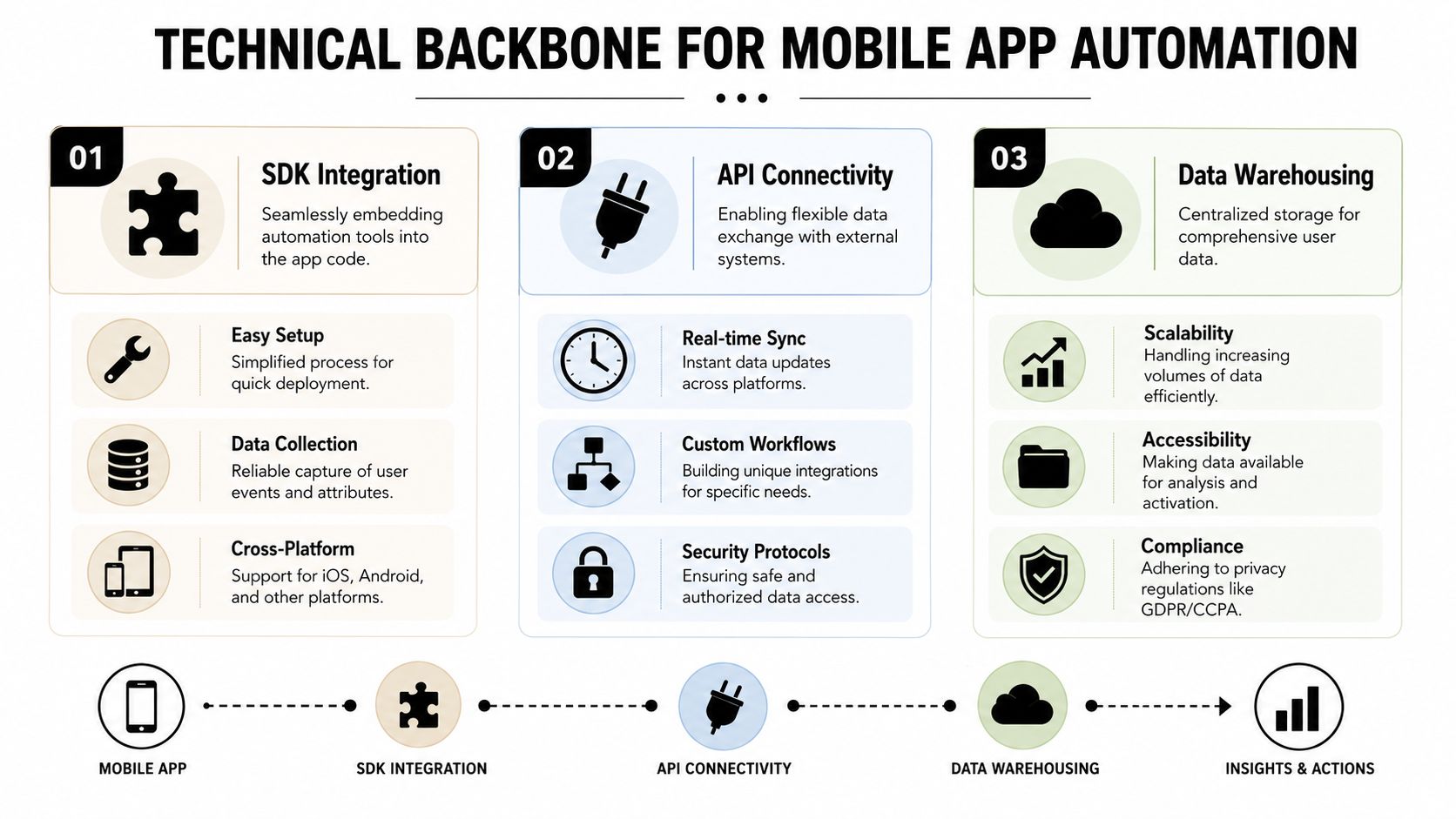
Implementing Your Technical and Integration Backbone
A player opens the game on a weak train connection, finishes a level, and becomes eligible for a starter pack. If the app has to call home before it can decide what to show, that offer either appears late or not at all. That is usually where teams discover their automation stack was designed for dashboards, not live gameplay.
Build for low-latency delivery
The runtime has to evaluate eligibility on device and render fast enough that the experience feels native to the session. Google's guidance on keeping frame rendering within tight latency budgets for smooth interaction is a useful reference point here. In practice, teams should treat offline-ready targeting and very low decision latency as baseline requirements for paywalls, quizzes, win-back prompts, and event announcements.
This matters even more in Unity, Flutter, and React Native environments. Background suspension, delayed lifecycle events, and spotty connectivity create failure modes that cloud-only orchestration struggles to handle. I have seen well-designed campaigns lose their edge because a remote decision arrived after the player had already moved to the next screen.
A workable pattern looks like this: ship event capture and eligibility rules in the client SDK, sync configs from the server, and keep final rendering logic in the app runtime. Use the backend for heavy audience computation and content management, but do not make every in-session decision depend on a live round trip.
Choose integrations that preserve optionality
The stack usually needs four parts working together:
- Client SDKs: iOS, Android, Unity, Flutter, or React Native runtimes for event capture, audience checks, and in-app rendering.
- Server-side APIs: attribution inputs, backend state, catalog data, subscription events, and remote config distribution.
- Analytics and warehouse layer: a place to inspect event quality, workflow performance, cohort movement, and export data for BI.
- Billing and entitlements: StoreKit 2, Google Play Billing, RevenueCat, or an internal entitlement service that keeps purchase state current.
Build versus buy depends on who will maintain it six months from now. A studio with strong mobile platform engineers can stitch together StoreKit, Play Billing, Segment or direct event pipelines, a warehouse, and a custom experience layer. The price is operational drag. Every extra integration point creates another place for user IDs to drift, entitlements to go stale, and experiment reads to break.
That is why I usually prefer a provider-agnostic setup over a single vendor that wants to own messaging, analytics, and payments. It keeps the automation layer replaceable and lets the billing system stay where finance and backend teams already trust it.
Don't ignore the revenue-share penalty
Billing economics belong in the technical review, not just procurement. Albato's app marketing strategies guide notes that some mobile automation and monetization platforms take a 15 to 20 percent revenue share on in-app purchase volume. That model can look fine at low scale, then become expensive right when retention work starts paying off.
The hidden cost is not only margin. It changes team behavior. Product and growth teams become more cautious about testing pricing, bundles, and reactivation offers because each win increases tooling cost. It also muddies ROI analysis when the same vendor sits on campaign logic and transaction-linked reporting.
A unified stack does not have to mean an all-in-one vendor. The cleaner approach is often an offline-ready runtime, your own event stream into the warehouse, and billing kept with StoreKit, Google Play Billing, RevenueCat, or another source you control. Nuxie can sit in that kind of architecture as the growth runtime and experimentation layer under its published pricing. Model both creation-credit charges and attributed-revenue fees before choosing an integration.
Measure implementation quality, not just launch completion
Before expanding automation coverage, validate the plumbing under real session conditions.
- Event completeness: key events arrive with the right user ID, timestamp, properties, campaign context, and store metadata.
- Trigger reliability: on-device conditions resolve correctly after cold starts, reconnects, and resumed sessions.
- Entitlement freshness: purchase state updates quickly enough to suppress expired offers and enable the right post-purchase path.
- Experiment integrity: users stay pinned to the assigned variant, and exposure logs match downstream conversion events.
I also recommend running a few deliberate failure tests. Kill the network mid-session. Delay the subscription webhook. Reinstall the app and confirm identity resolution. Force a stale config and watch what the runtime does. Teams that skip those checks often discover problems only after a live event or sale window has already started.
If experiment assignment is part of this layer, set it up with the same discipline you would use for economy tuning or onboarding tests. A good reference is this guide to A/B testing for mobile apps, especially around variant assignment and clean readouts.
When this backbone is set up well, automation stops behaving like a fragile campaign tool. It becomes operating infrastructure for retention and monetization.
Optimizing with Experiments and Analytics
A liveops sale goes out on Friday. CPI looks fine, push open rate looks fine, and the paywall team reports a lift. Then finance closes the week and net revenue is flat. In mobile, that usually means the experiment readout is wrong, the attribution path is broken, or both.
I treat automation analysis like economy tuning. Every flow needs a control path, a clear eligibility rule, and one primary outcome that matters to the business. For a reactivation flow, that might be D7 return rate. For a paywall test, it is usually trial start rate paired with downstream renewal and refund rate, not just top-of-funnel taps. If your stack supports offline evaluation and local caching, include that in the readout too. A message that converts only when the device is online is weaker than it looks, especially in games with uneven connectivity and long session gaps.
Keep test design tight. Change timing or change creative or change screen order. Do not change all three and call the result learnings. If onboarding quiz completion drops after a variant ships, the team should know whether the issue came from the trigger, the copy, or the extra step in the flow.
Measurement quality matters more than test volume. Analysts cannot trust a winner if exposure logs, assignment, and conversion events live in three tools with different user IDs. That is one reason I prefer a unified stack for in-app experiences, experimentation, analytics, billing, and entitlements, especially if it works offline and does not take a revenue share on billing data. The all-in-one platforms that look cheap up front often get expensive once subscription volume grows or once the team needs raw event access outside the vendor UI.
Teams do see meaningful gains from personalization when the basics are in place. Braze reports that personalized experiences can outperform generic ones, and its examples show materially higher conversion when content is matched to user context, rather than shown as a default to everyone (Braze personalization examples).
The other recurring failure is post-install visibility. AppsFlyer has documented how privacy changes and fragmented measurement reduce visibility across the user journey, which makes channel and lifecycle optimization less reliable (AppsFlyer on post-IDFA measurement challenges). In practice, that pushes teams toward bad decisions fast. Paid UA gets too much credit, in-app prompts get too little, and retention interventions are cut because they look weaker than they are.
What to monitor every week
A useful operating dashboard includes:
- Flow-level behavior: eligibility rate, entry rate, dismiss rate, completion rate, and next-action rate
- Monetization outcomes: purchase starts, subscription starts, renewal rate, refund rate, and ARPPU by exposed vs control users
- Retention outcomes: next-session rate, D1 or D7 return rate, and churn risk by segment
- Audience quality: segment size, overlap, suppression rate, stale profile rate, and identity resolution errors
- Experiment integrity: exposure count, sample ratio mismatch, variant stickiness, and event lag between client and server
I also watch for operational signals that do not show up in standard growth dashboards. Offline-triggered impressions, delayed entitlement updates, duplicate purchase events, and SDK version skew can all poison experiment results. If a variant wins only on one app version or only in sessions with a fresh network connection, that is not a rollout candidate yet.
If the team needs a practical framework for setting up clean variant assignment and readouts, this guide to A/B testing for mobile apps is a useful reference.
The best automation programs do fewer things, measure them cleanly, and keep the data path under their own control. That is how retention and monetization gains hold up after the sale window ends.
If your team wants one system for in-app experiences, experiments, analytics, billing, entitlements, and cross-platform growth workflows under its published pricing, take a look at Nuxie. It's built for shipping onboarding flows, paywalls, announcements, retention offers, and liveops moments across mobile apps and games without waiting on app releases.